This guide covers why built-in Azure features fall short, how Azure's two primary backup modes (operational and vaulted) actually work, a step-by-step configuration walkthrough, and how to manage blob backups at scale without losing visibility into storage costs.
Key Takeaways
- Native Azure durability replicates your data's current state, meaning corruption or accidental deletion can spread just as fast as clean data
- Azure Backup offers two modes: operational backup (continuous, local, up to 360 days) and vaulted backup (offsite, scheduled, up to 10 years)
- Point-in-time restore cannot recover deleted containers, leaving a gap for ransomware and malicious deletion scenarios
- Vaulted backup with immutability enabled is the strongest defense against source-account compromise
- Microsoft's default policy enables both modes in combination — using them together is the recommended approach
Why Native Azure Blob Storage Features Aren't Enough for Backup
Azure Blob Storage includes legitimate data protection capabilities: redundancy, soft delete, versioning, and point-in-time restore. The problem isn't that these features don't work — they reflect the current state of your data. If that state is corrupted, encrypted, or mass-deleted, your "protection" mirrors the damage just as faithfully.
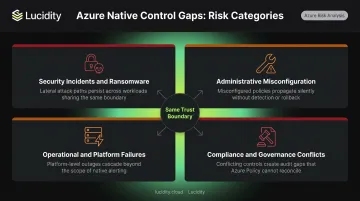
Four risk patterns make this especially dangerous.
Security Incidents and Ransomware
Compromised credentials or insider access can cause destruction at machine speed. Microsoft's threat intelligence report on Storm-0501 documented attackers deleting Azure resource locks and storage immutability policies, then performing mass deletion of storage accounts, snapshots, and restore points — then encrypting data with customer-managed keys before deleting those keys entirely. Native controls didn't stop it because the attackers had sufficient permissions to disable them first.
Administrative Misconfiguration
Human error is more common than most teams admit. Thales' 2025 Cloud Security Study found that misconfiguration was the leading root cause of cloud breaches at 31%. In Azure specifically:
- Accidentally deleted containers cannot be recovered through point-in-time restore operations
- Lifecycle policies configured too aggressively expire data before teams realize it
- If a storage account is deleted and another account with the same name is created, Microsoft's 14-day recovery window fails entirely
Operational and Platform Failures
ETL pipeline errors and failed blob commits happen regularly. Platform incidents do too. A 2018 cooling failure in Azure's South Central US region caused cascading hardware failures that took VSTS more than 21 hours to recover from — recovery depended entirely on restoring Azure Storage accounts in that region.
Cross-region or offsite backups are the only reliable defense against failures at the infrastructure layer.
Compliance and Governance Conflicts
WORM immutability policies are excellent for regulatory compliance but create real friction elsewhere. Once locked, time-based retention policies cannot be shortened — data cannot be modified or deleted until the retention period expires, even when rapid remediation is required.
What these four risks share is a common failure mode: native controls operate within the same trust boundary as the threat. A dedicated backup strategy — with independently governed, immutable copies stored outside that boundary — is the only way to close the gap.
Azure Blob Storage Backup Options: Operational vs. Vaulted Backup
Azure Backup supports two distinct backup types for blob data. They're designed to complement each other — operational backup handles short-term, in-place recovery, while vaulted backup provides offsite protection for longer-term resilience.
Operational Backup (Continuous)
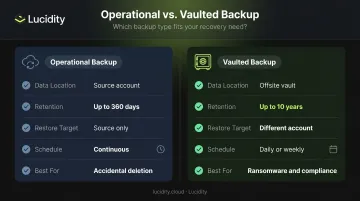
Operational backup is local, continuous protection. Data stays in the source storage account — nothing is transferred to a separate vault. Under the hood, it enables:
- Point-in-time restore
- Blob soft delete (set to policy retention + 5 days)
- Blob versioning
- Change feed
Retention is configurable up to 360 days, and Azure automatically applies a delete lock to the storage account.
Critical limitation: Restores can only target the source storage account. If a container is deleted via the Delete Container operation, it cannot be recovered through operational backup alone. This makes operational backup insufficient as a standalone solution against ransomware or deliberate deletion.
Vaulted Backup (Periodic, Offsite)
Where operational backup falls short, vaulted backup picks up. It copies data offsite to a Backup vault using object replication — asynchronously replicating block blobs from the source to a vault-managed destination storage account. Key characteristics:
- Schedules daily or weekly snapshots to the offsite vault
- Retains data up to 10 years using daily, weekly, monthly, and yearly rules (grandparent-parent-child rotation, where shorter cycles feed into longer ones)
- Restores to a different storage account only — never the source
Storing backups in a separate account is what makes vaulted backup genuinely resilient against compromise. If the source account is hit by ransomware or credential abuse, the offsite copy exists independently and can't be modified or deleted through the same access path.
Comparison Table
| Feature | Operational Backup | Vaulted Backup |
|---|---|---|
| Data location | Source storage account | Backup vault (offsite) |
| Retention limit | 360 days | 10 years |
| Restore target | Source account only | Different account only |
| Schedule type | Continuous | Daily or weekly |
| Best for | Accidental deletion, short-term recovery | Ransomware resilience, long-term retention, compliance |
How to Configure Azure Blob Storage Backup (Step-by-Step)
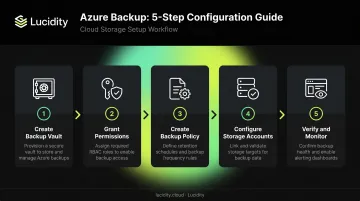
Step 1 — Create a Backup Vault
A Backup vault is the management entity that stores recovery points and governs backup operations. It's distinct from a Recovery Services vault — Azure Blob backup uses Backup vaults exclusively.
In the Azure portal, search for Resiliency and navigate to the Resiliency dashboard, then to Backup vaults. Even operational backup (which keeps data locally) requires a vault for management purposes.
Step 2 — Grant Permissions
The Backup vault needs the Storage Account Backup Contributor role on each storage account you want to protect. Assign this via Access Control (IAM) on the storage account.
A few things to note:
- Role propagation can take up to 30 minutes
- Assign roles at subscription or resource group level to cover multiple accounts at once
- Cross-subscription backup is supported
Step 3 — Create a Backup Policy
Navigate to Resiliency > Protection policies > Create Policy and select Azure Blobs as the datasource type. The policy defines:
- Retention duration (required for both backup types)
- Backup schedule (daily or weekly, required for vaulted backup)
- GFS retention rules for vaulted backups (daily, weekly, monthly, yearly)
Note: The current policy model requires vaulted backup to be selected by default and it cannot be disabled. Operational backup can be enabled alongside it.
Step 4 — Configure Backup on Storage Accounts
Go to Resiliency > Overview > Configure protection, select Azure Blobs, choose your vault and policy, then select your storage accounts.
Before finalizing, be aware of:
- 1,000-container limit per storage account for vaulted backup (containers can be excluded to stay within the limit)
- Azure performs automatic validation checks for permissions and prerequisites
- Cross-region restore is available if your vault is configured for geo-redundancy
Step 5 — Verify and Monitor
After configuration, Azure automatically enables the following on the source storage account:
- Point-in-time restore
- Blob versioning
- Soft delete (set to policy retention + 5 days)
- Change feed
- Delete lock on the storage account
Confirm each setting is active under the Data Protection tab of your storage account before treating the backup configuration as complete.
Managing and Monitoring Azure Blob Backups at Scale
Azure's Resiliency console (previously Backup Center) provides a centralized management pane for all blob backup operations. From one interface, teams can:
- View backup instances and job status
- Initiate restores and on-demand backups
- Update backup policies
- Generate backup usage and audit reports
Stopping protection disconnects the storage account from the vault but doesn't automatically disable versioning, change feed, or point-in-time restore on the storage account. For vaulted backup, Azure deletes the object replication policy from the source. Updating a backup instance lets teams swap the associated policy or, for vaulted backups, change which containers are included.
Blob backup is one piece of a larger storage management puzzle. Enterprises running Azure at scale also need visibility into their block storage — managed disks attached to VMs — where idle volumes and over-provisioning quietly accumulate cost. Lucidity's Lumen surfaces utilization data, tiering recommendations, and idle disk insights across Azure block storage, giving FinOps and ITOps teams a clearer picture of their full storage footprint.
Azure Blob Backup Cost Breakdown
Operational Backup
- No instance fee and no backup storage charges
- Costs arise from the underlying features enabled: soft delete, change feed, blob versioning, and point-in-time restore all increase stored data volume
- PITR restore billing is based on change feed data processed and storage transactions
Vaulted Backup
Three cost components apply:
| Cost Component | Basis |
|---|---|
| Protected instance fee | Size of data in the protected storage account |
| Write transaction fee | Per 10,000 write operations performed by the backup service |
| Backup storage fee | Volume stored in the vault × redundancy type (LRS, ZRS, or GRS) |
These three components can compound quickly at scale. Before deploying vaulted backup broadly, use the Azure Backup pricing calculator to model your expected costs. Your source account's storage tier (Hot, Cool, Archive) has a larger impact on total cost of ownership than it typically appears on paper.
Best Practices for Azure Blob Storage Backup
Three practices separate reliable blob backup configurations from ones that fail when it matters:
Layer operational and vaulted backup. Operational backup handles continuous protection against accidental deletion. Vaulted backup provides offsite, independently governed copies for long-term retention and ransomware resilience. Microsoft's default policy enables both — follow that model deliberately, not just because it's pre-selected.
Enforce separate credentials and immutability. Backup vaults should be governed under IAM roles separate from production storage accounts. Azure Backup supports this through built-in roles (Backup Contributor, Backup Operator, Backup Reader) and Multi-user Authorization via Resource Guard.
Key immutability notes:
- Vault immutability blocks operations that would cause loss of recovery points
- Once locked, immutability settings are irreversible — confirm configuration before enabling
- Immutability applies to vaulted backup only; operational blob backups are not covered
Run periodic restore tests. An untested backup is an untested assumption. Verify that containers, blob versions, and metadata recover correctly — and confirm your actual recovery time aligns with your RTO targets.
Frequently Asked Questions
How do I back up Azure Blob Storage?
Configure Azure Backup through a Backup vault in the Azure portal. You can enable operational backup (continuous, local, up to 360-day retention), vaulted backup (scheduled, offsite, up to 10-year retention), or both — which is the recommended approach.
What is the difference between Azure Storage and Azure Blob Storage?
Azure Storage is the broader platform that includes Blob, File, Queue, Table, and Disk storage services. Azure Blob Storage is specifically the object storage service within that platform, optimized for unstructured data like images, logs, backups, and AI/ML datasets.
What is the difference between operational and vaulted backup for Azure Blob?
The two options serve different purposes:
- Operational backup: Continuous, stored within the source account, restore-to-source only, up to 360-day retention
- Vaulted backup: Scheduled (daily or weekly), stored offsite in a Backup vault, supports restore to a different account, retention up to 10 years
Does Azure Blob Storage have built-in backup?
Azure Blob includes data protection features like soft delete, versioning, and change feed — but these are not standalone backups. Azure Backup must be explicitly configured to enable point-in-time restore, delete locks, and offsite vault copies.
What is the retention limit for Azure Blob backup?
Operational backup supports up to 360 days. Vaulted backup supports up to 10 years, with configurable daily, weekly, monthly, and yearly retention rules using Grandfather-Parent-Child (GPC) notation.
Can Azure Blob backup protect against ransomware?
Vaulted backup stored in a separately governed Backup vault with immutability enabled offers the strongest protection. Since backup copies exist independently of the production storage account, they cannot be modified or deleted even if the source account is compromised.