These questions matter more than they might seem. Choosing the wrong key management model can introduce unexpected Key Vault transaction costs, compliance gaps, or operational overhead that compounds at scale.
This guide covers how Azure Storage encryption at rest actually works, the three key management models and when to use each, advanced features like encryption scopes and double encryption, the Azure Disk Encryption retirement timeline, and best practices for keeping encrypted storage secure.
Key Takeaways
- All Azure Storage data is encrypted at rest by default using 256-bit AES-GCM — enabled automatically, no configuration required, cannot be disabled.
- Three key management models: Microsoft-managed keys (zero overhead), customer-managed keys (stored in Azure Key Vault, more control, per-operation cost), customer-provided keys (maximum control, maximum management burden).
- Advanced options include encryption scopes for per-container key isolation and infrastructure-level double encryption, both designed for organizations with stricter compliance requirements.
- Azure Disk Encryption retires September 15, 2028 — migrate to encryption at host before that deadline.
- Best practices: use Azure Key Vault with purge protection, automate key rotation, separate vaults by environment, and never hard-code secrets.
How Azure Storage Encryption at Rest Works
Azure Storage uses service-side encryption (SSE) to automatically encrypt data before it is written to persistent storage and decrypt it transparently on retrieval. No code changes, configuration, or performance tuning required.
The Encryption Standard
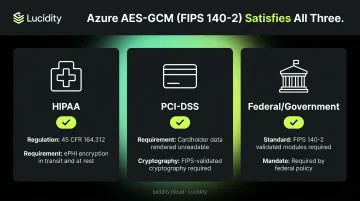
Azure Storage encryption uses 256-bit AES in Galois/Counter Mode (AES-GCM) , one of the strongest symmetric encryption algorithms available. The implementation is FIPS 140-2 compliant, which matters directly for regulated industries:
- HIPAA (Healthcare): 45 CFR 164.312 requires mechanisms to encrypt and decrypt electronic protected health information. Azure's default encryption satisfies this requirement.
- PCI-DSS (Finance): Stored cardholder data must be rendered unreadable. FIPS-validated cryptography meets this standard.
- Federal/Government: Many federal workloads require FIPS 140-2 validated modules by policy.
What Gets Encrypted
Encryption applies to everything — not just blobs:
- All blob types: block blobs, append blobs, page blobs (including archive tier)
- Azure Files, Queues, Tables
- Managed disks, snapshots, and images
- Object metadata
- Data in both primary and secondary regions when geo-replication is enabled
Always On, Always Free
Azure Storage encryption at rest cannot be disabled. It applies to every storage account regardless of performance tier (Standard or Premium) or access tier (Hot, Cool, Archive). There is also no additional cost for it.
Data is encrypted at the storage service layer before it reaches physical media, and decrypted on retrieval.
Azure Storage Encryption Models
Server-Side Encryption (SSE)
SSE is the default model. Azure handles encryption and decryption at the storage service layer. Three options control who manages the keys:
Microsoft-managed keys (MMK)
- Azure manages the full key lifecycle, including rotation
- Zero configuration required
- Rotation happens per Microsoft's compliance schedules automatically
- Right for teams without specific key sovereignty requirements
Customer-managed keys (CMK)
- You control, rotate, and can revoke keys stored in Azure Key Vault or Azure Key Vault Managed HSM
- For read/write operations, Azure Storage sends requests to Key Vault to unwrap the account encryption key
- This introduces per-operation transaction costs — see Key Vault pricing for details:
- Software-protected RSA 2,048-bit keys: $0.03 per 10,000 transactions
- HSM-protected keys: $1/month per key + transaction costs
- Automated key rotation: $1 per scheduled rotation
- Right for teams needing key custody, audit trails, or the ability to revoke access — disabling a key in Key Vault renders associated storage data inaccessible until re-enabled
Customer-provided keys
- The client sends an AES-256 encryption key with every read/write request
- Azure stores only a SHA-256 hash to validate the key — the key itself is never retained
- Maximum control, but all key distribution and management falls on your application
- Right for scenarios requiring zero key retention on Azure's side
Client-Side Encryption
SSE delegates key management to varying degrees — but if your threat model requires that Azure never sees plaintext data at all, client-side encryption is the answer. With this model, your application encrypts data before it reaches Azure. Microsoft has zero access to plaintext data or keys.
Critical warning: Client-side encryption v1 (AES-CBC mode) has a known security vulnerability and is no longer recommended. Teams still using v1 should migrate immediately.
Client-side encryption v2 uses AES-GCM and is supported in:
| SDK | Minimum Version |
|---|---|
| .NET | 12.13.0+ |
| Java | 12.18.0+ |
| Python | 12.13.0+ |
V2 uses an envelope encryption pattern: a content encryption key (CEK) encrypts the data, and a key encryption key (KEK) — often stored in Azure Key Vault — wraps the CEK.
Key Management Options for Azure Storage Encryption
Understanding the key hierarchy explains why Azure's encryption is resilient by design.
The Three-Level Key Hierarchy
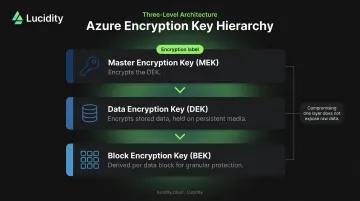
Azure uses three key types under the hood:
- Master Encryption Key (MEK): Encrypts the Data Encryption Key
- Data Encryption Key (DEK): Encrypts the actual stored data, held on persistent media
- Block Encryption Key (BEK): Derived from the DEK and the data block for per-block granularity
This layered approach means compromising one key doesn't expose raw data. Attackers would still need to break every layer in sequence.
Platform-Managed Keys (PMKs)
- Microsoft manages the full lifecycle
- Keys are rotated automatically per compliance requirements
- Microsoft handles rotation, auditing, and expiration — no team intervention required
- Appropriate when regulatory requirements don't mandate key custody
Customer-Managed Keys (CMKs) and BYOK
When compliance or data sovereignty rules require you to own the keys, PMKs aren't enough. CMKs are stored in Azure Key Vault, which supports:
- HSM Platform 1: FIPS 140-2 Level 2
- HSM Platform 2: FIPS 140-3 Level 3 (Managed HSM contexts)
You can also import existing keys using Bring Your Own Key (BYOK) support for HSM-protected keys.
CMKs are the right choice when you need data deletion assurance. Disabling a CMK in Key Vault renders associated storage data inaccessible — useful for GDPR right-to-erasure scenarios where cryptographic erasure is cleaner than physical deletion.
For managed disks, rotating a CMK re-wraps the DEK rather than re-encrypting disk data, so rotation has no downtime and no performance impact.
Advanced Azure Storage Encryption Features
Encryption Scopes
Encryption scopes let you assign different encryption keys to individual containers or blobs within a single storage account. Each scope can use either Microsoft-managed or customer-managed keys.
A practical use case: a SaaS provider can create a dedicated encryption scope per tenant. Deleting or disabling that tenant's key renders only their data inaccessible, without touching any other tenant's data. This makes off-boarding and GDPR compliance much cleaner than account-level key management.
Scopes can also be set as defaults for a container, with optional enforcement preventing blobs from overriding the container-level scope.
Infrastructure-Level Double Encryption
Infrastructure encryption (double encryption) encrypts data twice:
- Once at the service level (standard SSE)
- Once at the infrastructure level
Each layer uses a different encryption algorithm and different keys. This is a creation-time setting for storage accounts; you cannot add it to an existing account after creation. For Blob Storage, it can also be configured through an encryption scope. This feature targets organizations that need the highest assurance data stays protected even if one algorithm or key is compromised.
Azure Disk Encryption Retirement
Unlike the features above, this one requires immediate planning. If you're using Azure Disk Encryption (ADE), action is required.
Microsoft has confirmed ADE is scheduled for retirement on September 15, 2028. After that date, ADE-enabled workloads will continue running, but encrypted disks will fail to unlock after VM reboots, causing service disruption.
Key facts:
- In-place conversion is not supported — migration requires creating new disks and VMs
- Microsoft's recommended replacement: encryption at host for most workloads, or Confidential VM sizes for confidential computing workloads
- All ADE-enabled VMs, including backups, must migrate before the retirement date
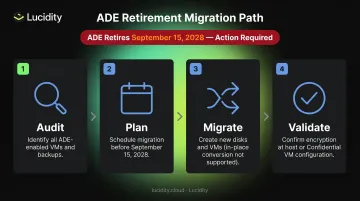
Start planning the migration now. Waiting until 2027 or 2028 leaves no room for testing.
Best Practices for Azure Storage Encryption at Rest
Use Azure Key Vault — and Structure It Properly
Store all customer-managed keys in Azure Key Vault (FIPS 140-2 Level 2 or Level 3 HSMs depending on tier). Structure your vaults deliberately:
- Separate vaults by environment: dev, staging, production — Microsoft recommends one vault per application, region, and environment
- Separate by application: access to one vault does not expose others; this limits blast radius if credentials for one environment are compromised
- Enable purge protection and soft delete: Azure Storage CMK configuration requires both; purge protection prevents permanent deletion during the retention interval even when soft-delete is active
Automate Key Rotation and Build an Audit Trail
- Azure Storage can automatically check Key Vault daily for new key versions and update accordingly — key rotation does not cause downtime or performance impact
- Automated rotation via Key Vault costs $1 per scheduled rotation
- Configure Key Vault Event Grid notifications for key lifecycle events:
Key New Version Created,Key Near Expiry,Key Expired - Maintain audit logs of all key access events — this is your evidence trail for compliance reviews
Keep Secrets Out of Code
Never hard-code keys, secrets, or connection strings in application code or infrastructure templates. Use managed identities for Azure resource authentication and enforce strict RBAC access controls on Key Vault.
Add Storage Utilization Visibility Alongside Encryption Controls
Encryption secures data on disk, but it doesn't address how efficiently that storage is actually used. At scale, encrypted Azure managed disks accumulate the same waste problems as unencrypted ones: idle disks no one has cleaned up, over-provisioned volumes running at 20% utilization, and costly tier mismatches.
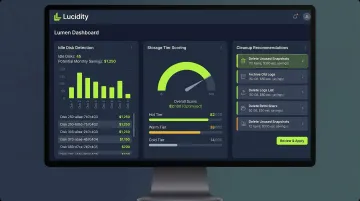
Lucidity's products provide the operational visibility layer that encryption controls alone don't cover:
- Lumen identifies all four types of idle disks (unattached, reserved, unmounted, and zero-I/O), scores every disk's tier against actual IOPS, throughput, and latency usage, and surfaces cleanup recommendations in one click
- AutoScaler autonomously right-sizes volumes in real time with zero downtime
Customers like Dometic have achieved a 52% reduction in cloud storage spend using both tools together.
Frequently Asked Questions
Does Azure Blob Storage support encryption at rest?
Yes. Azure Blob Storage encrypts all data at rest automatically using 256-bit AES-GCM, covering all blob types and access tiers. There is no additional cost and no configuration required.
What encryption does Azure use at rest?
Azure Storage uses 256-bit AES in Galois/Counter Mode (AES-GCM), applied at the storage service layer before data reaches physical media. The implementation is FIPS 140-2 compliant and covers all Azure Storage services: blobs, files, queues, tables, and managed disks.
Does data at rest need to be encrypted?
Major compliance frameworks require it: GDPR Article 32, HIPAA's technical safeguards (45 CFR 164.312), and PCI-DSS all mandate encryption or rendering stored data unreadable. Azure's default encryption helps satisfy these requirements, though specific mandates may require customer-managed keys.
What is the difference between Microsoft-managed keys and customer-managed keys in Azure?
Microsoft-managed keys require zero configuration — Azure handles all rotation automatically. Customer-managed keys (stored in Azure Key Vault) give your organization control over the key lifecycle, rotation schedule, and revocation capability, with added Key Vault transaction fees and operational overhead.
Can Azure Storage encryption be disabled?
No. Azure Storage encryption at rest is permanently enabled for all storage accounts, all performance tiers, all access tiers, and all redundancy configurations. There is no setting or API call that can disable it.
What is double encryption (infrastructure encryption) in Azure Storage?
Infrastructure encryption adds a second layer of 256-bit AES at the Azure infrastructure level, using separate keys and algorithms from the service-level layer — targeting organizations that require the highest assurance against encryption compromise. It must be configured at account creation time and cannot be added to existing accounts.