Introduction
Picking an Azure storage redundancy option feels deceptively simple: it's just a dropdown in the setup wizard. But that single choice determines your SLA eligibility, your recovery behavior during outages, and a meaningful chunk of your monthly cloud bill.
With six options available — LRS, ZRS, GRS, RA-GRS, GZRS, and RA-GZRS — each carrying different durability guarantees, geographic scope, and cost structures, the wrong selection can leave critical data exposed to a datacenter failure or inflate storage costs with geo-replication you don't actually need.
This article breaks down every option, compares durability guarantees and cost implications side by side, and gives you a concrete decision framework to match each redundancy tier to your actual workload requirements.
Key Takeaways
- Azure always stores at least 3 copies of your data; the redundancy option controls where those copies live
- LRS and ZRS protect within the primary region; GRS, GZRS, and their read-access variants extend to a paired secondary region
- Durability ranges from 11 nines (LRS) to 16 nines (GRS/GZRS), but higher protection means higher cost
- RA-GRS and RA-GZRS enable reads from the secondary region without triggering failover — useful for high-availability app designs
- The right choice depends on your RPO/RTO requirements, data governance constraints, and budget
What Azure Storage Redundancy Actually Means
Azure Storage redundancy is the automatic replication of your data to multiple physical locations to protect against hardware failures, network or power outages, and natural disasters. It's configured at the storage account level, which means the setting applies uniformly to every service within that account — Blob, Files, Queues, and Tables.
This matters architecturally. Redundancy isn't a passive safeguard; it's an active decision that shapes your:
- SLA eligibility: Higher redundancy tiers unlock stronger availability guarantees
- RPO: Determines how much data is at risk if a failure occurs before the next replication sync
- RTO: Affects how quickly read/write access is restored after an outage
- Cost: Storage and egress charges increase as replication scope widens
Getting these trade-offs wrong is one of the most common reasons teams either overspend on storage or discover gaps in their recovery strategy too late.
What Redundancy Does NOT Cover
Redundancy protects against infrastructure failures — if a datacenter goes dark, your data survives. It does not protect against:
- Accidental deletion
- Data corruption
- Ransomware overwrites
When a blob is deleted or overwritten, that change replicates to all copies immediately. For those scenarios, you need blob versioning, soft delete, or point-in-time restore — not a higher redundancy tier.
Primary Region Redundancy: LRS and ZRS
Regardless of which option you choose, Azure always writes data synchronously to 3 copies within the primary region before acknowledging the write as complete. The difference between LRS and ZRS is where those 3 copies sit.
Locally Redundant Storage (LRS)
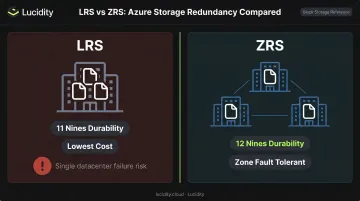
LRS stores all 3 copies within a single physical datacenter in the primary region. It provides 11 nines (99.999999999%) durability annually and is the lowest-cost option available.
The vulnerability is a datacenter-level event — fire, flooding, or a facility-wide power failure — making all 3 copies unavailable simultaneously. There's no geographic separation to absorb that failure.
When LRS makes sense:
- Dev/test environments
- Data that can be easily reconstructed
- Scenarios with strict data residency requirements that prevent cross-zone replication
Zone-Redundant Storage (ZRS)
ZRS distributes the 3 copies across 3 separate Azure availability zones within the primary region. Each zone has independent power, cooling, and networking, which eliminates the single-datacenter vulnerability.
ZRS provides 12 nines (99.9999999999%) durability and handles zone failures gracefully — Azure manages DNS repointing automatically, typically within seconds. Even so, applications should implement retry logic with exponential backoff to handle brief network interruptions during zone transitions.
Microsoft recommends ZRS for:
- Any production workload requiring high intra-region availability
- Azure Files workloads specifically (avoids remounting shares during zone failures)
- Workloads subject to data governance compliance within a specific geography
Secondary Region Redundancy: GRS, GZRS, and Read-Access Variants
When a complete regional outage is a credible risk, Azure offers asynchronous replication to a geographically paired secondary region, typically hundreds of miles away. That paired region is determined by Azure based on your primary region selection; you can't customize it. The full list of region pairs is published in Microsoft's documentation.
Geo-Redundant Storage (GRS)
GRS uses LRS synchronously in the primary region, then asynchronously replicates to the secondary, where it's also stored as LRS. This delivers 16 nines (99.99999999999999%) durability.
One important constraint: data in the secondary region is not readable unless a failover is initiated. Under normal operations, the secondary is purely a passive copy.
Geo-Zone-Redundant Storage (GZRS)
GZRS replaces LRS in the primary region with ZRS across 3 availability zones, then replicates asynchronously to the secondary region using LRS. It also delivers 16 nines durability but adds zone-level resilience on top of regional protection.
Microsoft recommends GZRS for applications requiring maximum consistency, durability, and disaster recovery resilience. One prerequisite: the primary region must support both availability zones and have a paired region.
Read-Access Variants: RA-GRS and RA-GZRS
RA-GRS and RA-GZRS extend GRS and GZRS by enabling continuous read access to the secondary endpoint, even when the primary region is fully operational. The secondary endpoint uses a -secondary suffix appended to the storage account name, and applications must be explicitly coded to read from it.
A few operational details worth knowing before adopting RA-GRS or RA-GZRS:
- Replication lag: Secondary data can trail the primary by up to 15 minutes — the documented RPO estimate for block blobs, not a hard SLA guarantee
- Last Sync Time: Teams can check this property to gauge replication lag before triggering a failover
- Stale reads: Reads from the secondary endpoint may return slightly outdated data, so applications need to handle eventual consistency explicitly
How to Choose the Right Redundancy Option
This decision comes down to three variables: durability requirement, geographic/compliance constraints, and cost tolerance. There's no universally correct answer — only the best fit for a given workload profile.
Decision Path
| Scenario | Recommended Option |
|---|---|
| Dev/test or reconstructable data | LRS |
| Production workload, single region | ZRS |
| Geo-redundancy needed, no secondary reads | GRS |
| Geo-redundancy + readable secondary | RA-GRS |
| Zone + regional protection, no secondary reads | GZRS |
| Zone + regional protection + readable secondary | RA-GZRS |
Understanding Failover Types
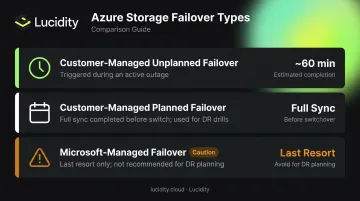
Before committing to geo-redundant storage, teams need to understand the three failover mechanisms:
- Customer-managed unplanned failover — initiated by your team during a primary region outage; typically completes within 60 minutes
- Customer-managed planned failover — used for DR drills or coordinated migrations; completes synchronization before switching
- Microsoft-managed failover — a last resort for catastrophic regional failures; Microsoft explicitly warns against relying on this for DR planning
The Over-Provisioning Problem
Choosing a higher redundancy tier solves where data is protected — but it doesn't address how much storage is being consumed. This is where costs compound.
Lucidity's research across hundreds of customer assessments shows the average enterprise runs at roughly 30% disk utilization, meaning approximately 70% of provisioned capacity sits unused. When geo-redundancy premiums are applied on top of over-provisioned volumes, the cost multiplies fast.
Lumen, Lucidity's storage observability product, surfaces idle disks, tier mismatches, and over-provisioned volumes that don't appear in native Azure dashboards. That gives FinOps and DevOps teams the visibility to right-size provisioned capacity alongside their redundancy strategy.
Cost Implications and Common Misconceptions
Current Pricing Reference
The table below shows indicative Hot tier blob storage prices for East US in USD (retrieved from the Azure Blob Storage pricing page):
| Redundancy | Price per GB/Month |
|---|---|
| LRS | $0.0208 |
| ZRS | $0.0260 |
| GRS | $0.0458 |
| RA-GRS | $0.0589 |
| GZRS | $0.0468 |
| RA-GZRS | $0.0585 |
Prices vary by region. Always verify current rates in your target region before making architecture decisions.
Migration Constraints Teams Frequently Miss
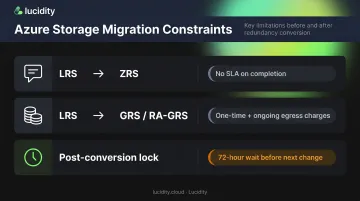
Switching redundancy options isn't always instantaneous:
- LRS → ZRS (or any zone-redundancy change): Requires opening an Azure support request. There is no SLA on completion time. If speed matters, manually copying data to a new account with the target redundancy is the only controlled-timeline option.
- Enabling geo-redundancy (LRS → GRS/RA-GRS): Incurs a one-time egress charge to replicate the entire account to the secondary region, plus ongoing egress charges for subsequent writes.
- 72-hour rule: After completing a zone-redundancy conversion, you must wait at least 72 hours before changing the redundancy setting again.
Top Misconceptions
Redundancy ≠ backup. This is the most common misunderstanding. Redundancy protects against infrastructure failures; it doesn't protect against bad data. A deleted file replicates immediately to all copies.
More redundancy isn't always better. GRS and GZRS require a paired region. If your data governance rules restrict data to a single geography, geo-redundancy may violate compliance requirements — even when it appears safer on paper.
Archive tier incompatibility. The archive access tier is incompatible with ZRS, GZRS, and RA-GZRS. If you convert a storage account containing archived blobs to one of these tiers, you'll need to rehydrate those blobs first.
Frequently Asked Questions
What is redundancy in Azure storage?
Azure storage redundancy is the automatic replication of your data to multiple physical locations — within a region or across paired regions — to ensure availability and durability during hardware failures, outages, or disasters. It's configured at the storage account level and applies to all data within that account.
How much does Azure storage redundancy cost?
Costs scale with replication scope — LRS runs roughly $0.0208/GB/month while RA-GZRS reaches $0.0585/GB/month (East US, Hot tier). Geo-redundant options add egress charges when first enabled and on subsequent writes. See the Azure Storage pricing page for current region-specific rates.
What is the difference between LRS and ZRS in Azure?
LRS stores 3 copies in a single datacenter (11 nines durability, lowest cost, vulnerable to datacenter-level failures). ZRS distributes those 3 copies across separate availability zones in the same region (12 nines durability, more resilient to zone failures, higher cost).
What is the difference between GRS and GZRS?
Both replicate to a secondary region asynchronously and deliver 16 nines durability. GRS uses LRS in the primary region; GZRS uses ZRS across availability zones. GZRS adds zone-level resilience within the primary region on top of the regional disaster protection.
Can I change my Azure storage redundancy after creation?
Yes, but with constraints:
- Zone-redundancy changes: Require a support-initiated conversion with no guaranteed timeline
- Geo-redundancy changes: Can be made via the Azure portal, PowerShell, or CLI without downtime
Does Azure storage redundancy protect against accidental data deletion?
No. Deletions and overwrites replicate to all copies immediately. For protection against accidental deletion or corruption, use blob versioning, soft delete, and point-in-time restore instead — each targets that specific risk directly.