Introduction
Azure Blob Storage handles everything from application logs and backup archives to document repositories and data lake foundations. As Microsoft describes it, it's object storage optimized for massive amounts of unstructured data — and a single storage account can scale to over 50 Tbps read throughput.
That scale creates a real operational problem. Without a structured metadata approach, finding a specific blob among millions or automating lifecycle decisions becomes guesswork.
Gartner notes that enterprises are struggling with exponential unstructured data growth and need better governance and optimization strategies — and metadata is one of the few levers teams can pull without restructuring their storage architecture.
This guide covers how Azure Blob Storage metadata actually works: setting and retrieving it via the SDK and REST API, navigating its hard limits, and knowing when blob index tags are the stronger choice for filtering and querying at scale.
Key Takeaways
- Azure Blob Storage metadata = user-defined name-value pairs attached to blobs or containers; doesn't affect blob content
- Hard limit: 8 KB total per blob across all metadata name-value pairs
- Metadata names must follow C# identifier rules; they're case-insensitive but case-preserving
SetMetadataAsyncfully overwrites existing metadata — always read before writing- Blob index tags are natively searchable; metadata requires a separate index or Azure AI Search to query
- Agree on naming conventions before scaling — ad hoc metadata becomes unmanageable fast
When and Why to Use Metadata in Azure Blob Storage
Metadata is the right tool when you need to attach contextual information to a blob without touching its content. Think owner attribution, data classification labels, processing status flags, project IDs, or expiry markers.
Where metadata adds clear operational value:
- Document management pipelines that need to track upload source, author, or review status
- Data lake governance where blobs need department or data-type categorization
- Multi-team storage environments requiring cost attribution by business unit
- Audit trails that record when a blob was processed or by which system
- Automation triggers that flag blobs for downstream pipeline actions
Where Metadata Gets Misused
Three common misuses to avoid:
The Blob service cannot natively index or search metadata — so if you're treating it as a search index, you'll hit a wall fast. Finding blobs by attribute value requires a separate indexing solution.
The 8 KB ceiling exists for descriptive attributes, not serialized JSON payloads. If your metadata is growing complex, that data belongs in a proper store.
Metadata carries no access control weight. Blob index tags support RBAC attribute-based access conditions; metadata does not. Security-sensitive tagging at this layer is a false assumption.
What You Need Before Setting Blob Metadata
No feature flag or special configuration is required — metadata is a native capability of every Azure Blob Storage resource. That said, three things need to be in place before you start writing metadata programmatically.
| Requirement | Why It Matters |
|---|---|
| Active Azure Storage account with a provisioned container | Metadata lives on blobs and containers within this account |
| Storage Blob Data Contributor role (or higher) for writes | Set Blob Metadata requires write permissions on the blob |
| Storage Blob Data Reader role for reads | Get Blob Properties and Get Blob Metadata require read access |
| Azure SDK (.NET, Python, JavaScript, Java, Go) or REST API access | Required to set and retrieve metadata programmatically |
Before scaling to production, align with your team on a naming schema. Metadata names must follow C# identifier rules, and there's no enforcement mechanism built into the service — metadata keys can't be renamed, only deleted and re-added, so inconsistent conventions are costly to fix at scale.
How to Set and Retrieve Azure Blob Storage Metadata
The most important thing to understand about metadata operations is this: setting metadata replaces all existing keys — it does not merge with them. If you call SetMetadataAsync with two key-value pairs on a blob that has five, you'll end up with two. The other three are gone.
This means every metadata write operation should follow a read-merge-write discipline.
Setting Metadata on a Blob
In the .NET SDK, you populate a dictionary and call SetMetadataAsync on a BlobClient:
// Step 1: Read existing metadata
BlobProperties properties = await blobClient.GetPropertiesAsync();
Dictionary<string, string> metadata = new Dictionary<string, string>(properties.Metadata);

// Step 2: Add or update keys
metadata["owner"] = "data-engineering";
metadata["data-classification"] = "internal";
metadata["processing-status"] = "pending";

// Step 3: Write the full merged dictionary
await blobClient.SetMetadataAsync(metadata);
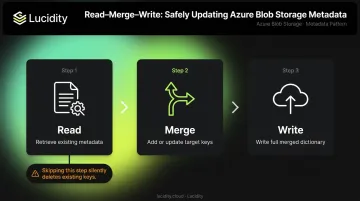
Skipping step 1 is the most common metadata bug in production. The call succeeds either way — it just silently drops any keys not included in the dictionary you pass.
Retrieving Metadata from a Blob
GetPropertiesAsync retrieves system properties, standard HTTP properties, and user-defined metadata in a single call:
BlobProperties properties = await blobClient.GetPropertiesAsync();

foreach (var metadataItem in properties.Metadata)
{
    Console.WriteLine($"{metadataItem.Key}: {metadataItem.Value}");
}
For lightweight checks in high-throughput scenarios, an HTTP HEAD request retrieves metadata headers without downloading blob content. This matters when you're checking metadata on thousands of blobs — you don't want to pull binary content for what's essentially a label lookup.
Metadata Naming Rules and Format
At the REST layer, Azure transmits metadata as x-ms-meta-{name}:{value} headers. Valid name requirements:
- Names must be valid C# identifiers: start with a letter or underscore, contain only letters, digits, and underscores
- Case-insensitive, but preserves the case used when first created
- Submitting two headers with the same name returns a 400 Bad Request
- Total size of all name-value pairs cannot exceed 8 KB
Invalid metadata names cause request failures — validate names programmatically whenever they're derived from user input or dynamic sources. With naming constraints handled, you're ready to build reliable metadata workflows on top of this foundation.
Blob Index Tags vs. Metadata: What's the Difference?
Both features attach key-value information to blobs. The difference is what happens after you attach them.
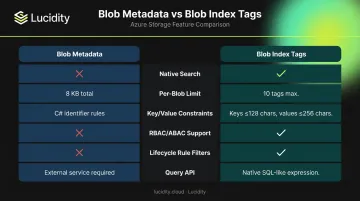
| Dimension | Blob Metadata | Blob Index Tags |
|---|---|---|
| Native search | Not supported | Automatically indexed; queryable via Find Blobs by Tags |
| Per-blob limit | 8 KB total across all pairs | Up to 10 tags per blob |
| Key/value constraints | C# identifier names; string values | Keys ≤ 128 chars; values ≤ 256 chars |
| RBAC / ABAC support | Not supported as a condition attribute | Supported in role assignment conditions |
| Lifecycle rule filters | Not supported as a lifecycle filter | Supported as a lifecycle rule filter |
| Query API | Requires external service (e.g., Azure AI Search) | Native SQL-like expression via REST |
Which One Should You Use?
Each feature has a clear lane:
- Choose metadata for operational context, pipeline tracking, and descriptive attributes that don't need filtering across the storage account — owner names, processing status, audit notes, classification labels.
- Choose blob index tags when you need to find blobs by attribute value at scale without building a separate indexing layer. Lifecycle rules acting on blob subsets also require tags, not metadata.
- Use both when your use case demands search and rich context. Store searchable, governance-critical attributes as index tags (up to 10); store richer descriptive context as metadata. They're complementary, not competing.
Access control is worth calling out specifically: index tags can appear in Azure RBAC attribute-based conditions, enabling fine-grained access policies based on tag values. Metadata doesn't support this. For any security-relevant attribute, index tags are the right layer.
Best Practices for Using Azure Blob Storage Metadata Effectively
Getting metadata right is about consistency and discipline more than technical complexity. These practices hold up when you're operating at volume.
Establish a Naming Convention First
Agree on a schema before any code goes to production. A basic governance schema might include:
owner— team or individual responsible for the blobdata-classification— public, internal, confidentialproject-id— links blob to a billing or project recordretention-policy— drives lifecycle automationprocessing-status— ingested, processed, archived
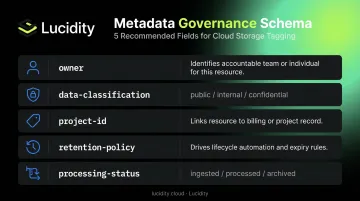
Document this schema in your team's runbooks. Once inconsistent metadata accumulates at volume, cleaning it up retroactively is nearly impossible.
Always Read Before You Write
Any automation or SDK code that updates individual metadata keys must follow the read-merge-write pattern shown earlier. Build this as a reusable utility function rather than repeating the logic in every service. One missed read operation in a background job can silently clear metadata across thousands of blobs before anyone notices.
Use Metadata to Drive Lifecycle Automation
Blob lifecycle management rules can filter on index tags — but you can still use metadata to store the context that informs your lifecycle strategy. A blob tagged with retention-policy: 90-days in metadata can feed an external script or pipeline that applies the appropriate lifecycle action. For teams that want native lifecycle rule integration, pair the metadata label with a corresponding index tag.
Keep Metadata Lightweight
The 8 KB limit sounds generous until you're storing metadata at scale. Practical guidance:
- Store only attributes you'll actually read or act on
- Don't serialize JSON objects or multi-field structures into a single value
- For rich, structured metadata (schema definitions, extended audit records), store it in Azure Table Storage or Cosmos DB and reference the blob's storage path as the lookup key
Connect Metadata Governance to Actual Storage Costs
Metadata governance is one layer of a broader storage management strategy. For enterprises managing cloud infrastructure at scale, tagging data properly is valuable — but it doesn't directly reduce spend on its own.
Lucidity works at the block storage layer — autonomously scaling Azure Managed Disks, detecting idle volumes, and eliminating the over-provisioning that drives wasted cloud spend. It's scoped to block storage rather than blob storage, but it illustrates where dedicated tooling translates governance visibility into measurable cost reduction across Azure infrastructure.
Frequently Asked Questions
What is Azure Blob Storage metadata?
Azure Blob Storage metadata is a set of user-defined name-value pairs attached to a blob or container to store descriptive information. It doesn't affect the blob's content and is returned as HTTP headers alongside blob properties when you call Get Blob Properties.
What are the metadata limitations for Azure Blob Storage?
The total size of all metadata name-value pairs on a blob cannot exceed 8 KB. Names must follow C# identifier naming rules, are case-insensitive (but case-preserving), and setting metadata replaces all existing pairs — partial updates aren't supported natively.
What is the difference between blob index tags and metadata in Azure Blob Storage?
Blob index tags are automatically indexed and natively queryable by the Blob service using Find Blobs by Tags. Metadata cannot be natively searched — querying blobs by metadata values requires an external service like Azure AI Search. Both can be used together on the same blob.
Can you search Azure Blob Storage by metadata?
Not natively. You need an external indexing solution — such as Azure AI Search or Azure Table Storage — to query blobs by metadata values.
How do you set metadata on an Azure blob using .NET?
Use SetMetadataAsync on a BlobClient, passing an IDictionary<string, string> of key-value pairs. Each call fully replaces all existing metadata, so always retrieve current metadata with GetPropertiesAsync first and merge your changes before writing.
Does updating metadata in Azure Blob Storage overwrite existing metadata?
Yes — every call to the set metadata operation replaces all existing name-value pairs. Use the retrieve-merge-write pattern described above to avoid losing metadata you want to keep.