Azure Workload Identity is Microsoft Entra's answer to this problem. It replaces both the deprecated AAD Pod Identity (archived September 2023, supported through September 2025 for migration only) and manual secret injection, using OIDC federation and Kubernetes service accounts to issue short-lived tokens instead.
This guide covers how Workload Identity works architecturally, what you need to set it up correctly on AKS, and the specific configuration mistakes that cause silent authentication failures in real environments.
Key Takeaways
- Azure Workload Identity lets AKS pods authenticate to Azure services with zero stored secrets; OIDC federation between the cluster and Microsoft Entra ID handles all token exchange
- You need AKS 1.22+, Azure CLI 2.47.0+, a User-Assigned Managed Identity, and the OIDC issuer enabled on the cluster
- Four components must be linked: OIDC issuer, Kubernetes Service Account, Federated Identity Credential, and the workload identity pod label
- Use
DefaultAzureCredentialin your application — it picks up the injected environment variables automatically - This is not AAD Pod Identity. It's the GA successor: better scale, no custom CRDs, and cross-platform (Windows + Linux)
What Is Azure Workload Identity and When Should You Use It?
Azure Workload Identity assigns a software-level identity — backed by a Microsoft Entra Managed Identity or app registration — to a Kubernetes workload. The pod authenticates to Azure-protected resources without any passwords, connection strings, or secrets stored anywhere in the cluster.
Azure AD Workload Identity reached General Availability in April 2023 and supports production workloads on both Linux and Windows.
When to use it
- Individual microservices in AKS need access to Azure Key Vault, Storage, Service Bus, or Microsoft Graph
- You need per-workload identity isolation so each service holds its own permissions scope
- You're migrating off AAD Pod Identity before September 2025
- Secrets rotation has become an operational burden or compliance risk
That said, Workload Identity isn't the answer to every AKS identity problem.
When it's not the right tool
- Cluster-to-Azure control plane authentication — that's handled by AKS managed identities, not Workload Identity
- Non-Azure identity federation — possible but requires additional configuration beyond what's covered here
How Azure Workload Identity Works in AKS
Most Azure Workload Identity configuration failures trace back to one root cause: a mismatch between values that must align exactly. Here's how each layer of the system fits together.
The OIDC federation model
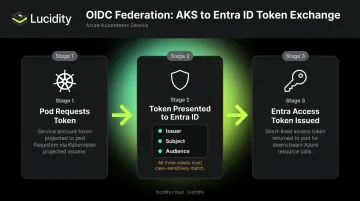
The AKS cluster acts as a token issuer. When a pod runs, Kubernetes projects a short-lived service account token into the pod's filesystem at /var/run/secrets/azure/tokens/azure-identity-token. The application presents this token to Microsoft Entra ID, which verifies it against the cluster's OIDC discovery endpoint and exchanges it for an Entra access token.
Microsoft Entra workload identity federation validates three values during this exchange: the issuer, the subject, and the audience. All three must case-sensitively match what's configured in the federated identity credential. Any mismatch and the exchange fails silently.
The mutating admission webhook
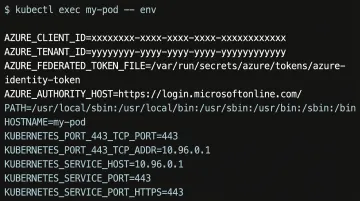
When a pod carries the label azure.workload.identity/use: "true", the webhook automatically injects four environment variables into the container:
AZURE_CLIENT_IDAZURE_TENANT_IDAZURE_FEDERATED_TOKEN_FILEAZURE_AUTHORITY_HOST
The application SDK reads these automatically — no manual credential configuration needed. If these variables are absent when you exec into a running pod, the webhook didn't fire, which usually means the label is missing or misplaced.
The Federated Identity Credential as the trust bridge
The webhook handles the pod side. On the Azure side, the federated identity credential is the record that tells Entra ID: "trust tokens issued by this AKS cluster for this specific Kubernetes service account in this namespace." The subject field must be formatted exactly as:
system:serviceaccount:<namespace>:<service-account-name>
Get a single character wrong here and you'll see AADSTS70021: No matching federated identity record found with no obvious hint about the cause.
Known limitations
| Limitation | Detail |
|---|---|
| Max federated credentials | 20 per managed identity |
| Propagation delay | A few seconds after creation; requests can fail until propagation completes |
| Virtual nodes | Not supported (Virtual Kubelet / Virtual Nodes add-on) |
| Regional restriction | Federated credentials not supported for user-assigned managed identities created in Malaysia South |
What You Need Before Getting Started
| Prerequisite | Why it matters |
|---|---|
| AKS cluster version 1.22+ | Workload Identity features aren't available on earlier versions |
| Azure CLI 2.47.0+ | Earlier versions lack the --enable-workload-identity flag |
kubectl authenticated to the cluster |
Required to apply service account and pod manifests |
| User-Assigned Managed Identity | The Azure-side identity your pod will impersonate — system-assigned identities cannot be used here |
| OIDC issuer enabled on the cluster | Allows the cluster to publish its signing keys to a URL Entra ID can query |
Enabling the OIDC issuer on an existing cluster requires an API server restart and causes brief downtime, per the current AKS documentation. Don't run this against production without a maintenance window.
How to Configure Azure Workload Identity in AKS
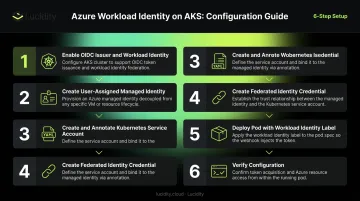
These six steps take you from a bare AKS cluster to a running pod that authenticates against Azure resources without storing a single secret. The two most common causes of silent authentication failures: skipping the federated credential step, and mismatching the service account namespace or name in the subject field.
Step 1: Enable OIDC Issuer and Workload Identity on the Cluster
Run az aks update with both flags on an existing cluster:
az aks update \
  --resource-group <resource-group> \
  --name <cluster-name> \
  --enable-oidc-issuer \
  --enable-workload-identity
Then export the OIDC issuer URL — you'll need it when creating the federated credential:
export AKS_OIDC_ISSUER="$(az aks show \
  --resource-group <resource-group> \
  --name <cluster-name> \
  --query "oidcIssuerProfile.issuerUrl" -o tsv)"
Critical: The issuer URL must include the trailing /. Using https://oidc.prod-aks.azure.com/XXXXXX instead of https://oidc.prod-aks.azure.com/XXXXXX/ causes an HTTP 400 error during token exchange — one of the harder failures to diagnose because the error message doesn't point directly at the slash.
Step 2: Create a User-Assigned Managed Identity
az identity create \
  --resource-group <resource-group> \
  --name <identity-name>

export USER_ASSIGNED_CLIENT_ID="$(az identity show \
  --resource-group <resource-group> \
  --name <identity-name> \
  --query 'clientId' -o tsv)"
This client ID will appear in both the Kubernetes service account annotation and the federated credential. Create the identity in the same subscription as your AKS cluster, in a resource group where your account has Contributor or Managed Identity Contributor permissions.
Step 3: Create and Annotate the Kubernetes Service Account
apiVersion: v1
kind: ServiceAccount
metadata:
  name: <service-account-name>
  namespace: <namespace>
  annotations:
    azure.workload.identity/client-id: "<USER_ASSIGNED_CLIENT_ID>"
The namespace and name you choose here must match exactly what you specify in the federated credential's subject field in the next step.
Step 4: Create the Federated Identity Credential
az identity federated-credential create \
  --identity-name <identity-name> \
  --name <federated-credential-name> \
  --resource-group <resource-group> \
  --issuer "${AKS_OIDC_ISSUER}" \
  --subject "system:serviceaccount:<namespace>:<service-account-name>" \
  --audiences api://AzureADTokenExchange
After creation, wait 10–30 seconds before testing. Requests made immediately after creation can return AADSTS70021 even with a correct configuration.
Step 5: Deploy the Pod with the Workload Identity Label
apiVersion: v1
kind: Pod
metadata:
  name: <pod-name>
  namespace: <namespace>
  labels:
    azure.workload.identity/use: "true"
spec:
  serviceAccountName: <service-account-name>
  containers:
    - name: <container-name>
      image: <your-image>
Only pods carrying this label are mutated by the admission webhook — without it, none of the four environment variables get injected.
Step 6: Verify the Configuration
Exec into the running pod and confirm the webhook fired:
kubectl exec -it <pod-name> -n <namespace> -- env | grep AZURE
You should see all four variables: AZURE_CLIENT_ID, AZURE_TENANT_ID, AZURE_FEDERATED_TOKEN_FILE, and AZURE_AUTHORITY_HOST. If any are missing, the label is likely absent or misplaced in the pod spec. Once all four variables are present, call DefaultAzureCredential in your application — a successful token exchange returns a valid bearer token with no credential configuration required in code. If the call fails with AuthenticationFailedException, verify the managed identity has the correct role assignment on the target Azure resource (Key Vault, Storage, etc.).
Best Practices for Using Azure Workload Identity Effectively
Assign a dedicated managed identity per workload
Give each microservice its own User-Assigned Managed Identity rather than sharing one across workloads. Official Azure samples describe workload identities as intended for the exclusive use of a single application — not shared across services.
Benefits of this approach:
- Limits blast radius if a pod is compromised
- Enables precise RBAC scoping per service
- Makes audit trails unambiguous
One operational note: if you update a service account annotation after initial deployment, restart the affected pods — changes don't propagate to running containers automatically.
Use DefaultAzureCredential in application code
The minimum SDK versions that support Workload Identity token injection are:
| Language | Package | Minimum Version |
|---|---|---|
| .NET | Azure.Identity |
1.9.0 |
| Java | azure-identity |
1.9.0 |
| Python | azure-identity |
1.13.0 |
| Go | azidentity |
1.3.0 |
| Node.js | @azure/identity |
3.2.0 |
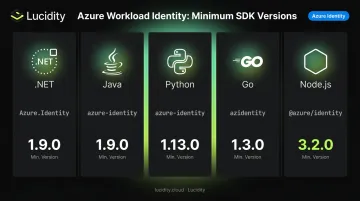
Don't manually read environment variables and implement custom token exchange logic. DefaultAzureCredential handles the full chain automatically, and it also falls back to Azure CLI credentials for local development — meaning the same code works in both your laptop environment and in AKS without any changes.
Consider storage costs alongside identity security
Locking down credential access solves one operational problem. The persistent volumes those workloads actually read from and write to can introduce another: wasted spend. Enterprise data consistently shows average disk utilization sitting around 30%, meaning most teams are paying for more than twice the storage they use.
For DevOps teams running AKS workloads on Azure Managed Disks, Lucidity's AutoScaler handles real-time volume expansion and shrinking with zero downtime and no workload configuration changes — addressing the cost side of production operations without adding operational overhead.
Frequently Asked Questions
What is a workload identity in Azure?
A workload identity in Azure is an identity assigned to a software entity — an application, service, or container — rather than a human user. In AKS, it's backed by a User-Assigned Managed Identity federated to a Kubernetes service account, letting the pod authenticate to Azure services via Microsoft Entra ID with no stored credentials.
Is Azure Workload Identity the same as AAD Pod Identity?
No. AAD Pod Identity was a preview-only feature deprecated on October 24, 2022 and archived in September 2023. Azure Workload Identity is its GA successor, built on OIDC federation with native Kubernetes capabilities, no custom CRDs, better scalability, and support for both Linux and Windows workloads.
What are the prerequisites for enabling Azure Workload Identity on AKS?
Prerequisites include:
- AKS cluster version 1.22+ and Azure CLI 2.47.0+
- A User-Assigned Managed Identity (system-assigned identities are not supported)
- OIDC issuer enabled and the workload identity feature flag set via
az aks update --enable-workload-identity
What is a federated identity credential and why is it required?
A federated identity credential is an Azure-side trust record that tells Entra ID to accept tokens issued by a specific OIDC provider for a specific service account subject. Without it, Entra ID rejects the token during the exchange step and returns AADSTS70021.
What are the known limitations of Azure Workload Identity on AKS?
The main limitations are: maximum 20 federated identity credentials per managed identity, a propagation delay of a few seconds after initial credential creation, no support for Virtual Nodes (Virtual Kubelet), and regional restrictions — federated credentials on user-assigned managed identities created in Malaysia South are not supported.
Can Azure Workload Identity be used with non-AKS Kubernetes clusters?
Yes. The feature supports self-managed Kubernetes clusters in any cloud or on-premises environment, as long as the cluster exposes a publicly accessible OIDC issuer endpoint. Install the mutating admission webhook via Helm and host the OIDC discovery document and JWKS at a public URL that Entra ID can reach.