Introduction
Azure adoption has accelerated faster than most security teams anticipated — and the security gap it creates is real. The 2025 Verizon Data Breach Investigations Report analyzed over 22,000 incidents and found vulnerability exploitation appeared in 20% of breaches, up 34% year-over-year. Meanwhile, ransomware featured in 44% of reviewed breaches.
Most of these incidents target exactly what Azure's native infrastructure controls don't protect: workloads. Virtual machines, containers, databases, storage accounts — these run on Azure's infrastructure, but securing them is the customer's job.
That's the shared responsibility gap. Cloud Workload Protection (CWPP), implemented in Azure through Microsoft Defender for Cloud, is what closes it — and understanding how it works operationally is where most teams need to start.
Key Takeaways
- Azure CWPP is the workload-layer security pillar of Microsoft Defender for Cloud, covering VMs, containers, databases, and serverless functions
- It detects active threats by monitoring workload behavior against Microsoft's global threat intelligence network
- CWPP differs from CSPM: CSPM checks whether resources are configured securely; CWPP detects active threats at runtime
- Effective deployment requires enabling the right Defender plans — turning on Defender for Cloud alone does not activate workload protection
What Is Azure Cloud Workload Protection?
CWPP is the component of cloud security focused on runtime threat detection and active defense of cloud workloads — the actual compute, data, and application assets running in your environment, not the underlying infrastructure configuration.
In Azure, CWPP is delivered through Microsoft Defender for Cloud's modular workload protection plans:
- Defender for Servers — Windows and Linux VMs
- Defender for Containers — Kubernetes clusters and container registries
- Defender for Storage — Azure Blob, Files, and Data Lake Storage
- Defender for Databases — Azure SQL, Cosmos DB, and open-source relational databases
- Defender for App Service — web apps and hosted APIs
- Defender for Key Vault — cryptographic keys and secrets
- Defender for APIs — business-critical API traffic
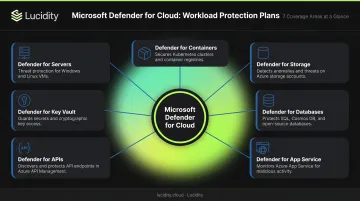
Each plan is tailored to the specific attack surface and risk profile of that workload type. You enable only the plans relevant to your environment, and pricing is per-resource per plan.
CWPP vs. CSPM: Not the Same Thing
This distinction matters practically. CSPM asks: "Are my resources configured securely?" CWPP asks: "Are my workloads being attacked right now?"
Both capabilities live inside Microsoft Defender for Cloud, but they serve fundamentally different functions. Foundational CSPM is free and enabled automatically — CWPP requires activating individual paid Defender plans. Teams that skip this step often assume they have runtime protection when they actually have only posture visibility, leaving active attacks undetected.
Why Azure CWPP Is Critical for Enterprise Cloud Security
The Shared Responsibility Gap
Azure secures the physical infrastructure, the hypervisor layer, and the underlying network fabric. Everything running on top of that — your OS, containers, application code, databases, and storage data — is the customer's responsibility.
The Microsoft Digital Defense Report 2024 makes this concrete: 90% of organizations had at least one attack path exposing critical assets, and 40% of those paths involved lateral movement via non-interactive remote code execution. The infrastructure held. The workloads didn't.
Without CWPP, you're flying blind across:
- Undetected lateral movement between VMs
- Container exploitation at runtime (Microsoft documented Storm-1977 creating 200+ containers for unauthorized cryptomining through compromised guest accounts)
- SQL injection on unmonitored databases
- Storage account abuse through SAS token misuse — including a real incident where an overly permissive SAS token exposed 38TB of Microsoft's own private data
Compliance Requirements
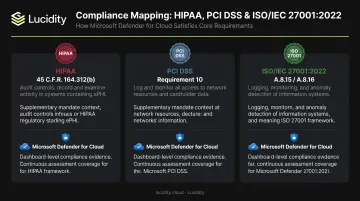
Those attack vectors aren't just security risks — they're compliance liabilities. Regulators across industries have responded with explicit monitoring and logging mandates that CWPP directly addresses:
- HIPAA (45 C.F.R. 164.312(b)) requires hardware, software, or procedural mechanisms to record and examine activity in information systems containing ePHI
- PCI DSS Requirement 10 mandates tracking and monitoring all access to network resources and cardholder data
- ISO/IEC 27001:2022 requires information security monitoring and logging controls
Microsoft Defender for Cloud's regulatory compliance dashboard includes PCI DSS v4.0.1 and ISO/IEC 27001:2022 mappings. This gives teams the audit trails, alerts, and posture scores needed to satisfy auditors — without building that evidence manually.
How Azure CWPP Works
Defender for Cloud ingests telemetry from enabled workload plans, normalizes it, and cross-references it against Microsoft's global threat intelligence network. The result: prioritized alerts and recommendations surfaced through a unified dashboard.
Threat Detection and Signal Collection
Each Defender plan collects workload-level telemetry through agents or agentless scanning. Agentless machine scanning (supported for Defender for Servers Plan 2) uses VM disk snapshots to analyze software inventory, vulnerabilities, and secrets without installing an agent.
Note: Microsoft retired the Log Analytics MMA agent in November 2024. Current plans emphasize Defender for Endpoint integration and agentless approaches for most server features.
Plan-specific signals include:
- Kubernetes API server activity
- App Service requests and responses
- Key Vault access attempts
- API runtime traffic
- Server file and registry changes
Behavioral Analysis and Alert Generation
Defender for Cloud processes raw telemetry using correlation rules, anomaly detection models, and Microsoft Threat Intelligence to generate actionable alerts. Detected patterns are mapped to the MITRE ATT&CK framework (based on ATT&CK v9), giving security teams context on tactics and kill-chain stage.
Alerts are ranked by severity. When multiple alerts share a common attack chain, Defender for Cloud groups them into a security incident, reducing the cognitive load on analysts who would otherwise triage each alert in isolation.
Automated and Guided Response
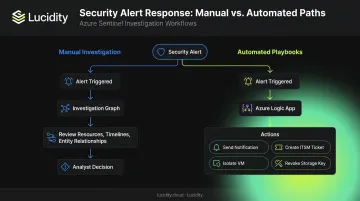
Security teams have two response paths:
- Manual investigation using the investigation graph, which shows affected resources, timelines, and entity relationships
- Automated playbooks built on Azure Logic Apps — triggered by security alerts to send notifications, create ITSM tickets, isolate a compromised VM, or revoke a storage access key
Defender for Cloud also produces a Secure Score — a continuous measurement of security posture based on the remediation status of active recommendations. It gives teams a single number to track workload security improvement over time.
What Azure CWPP Protects: Key Workload Types
Servers — Defender for Servers
Covers Windows and Linux VMs across Azure, AWS, GCP, and on-premises via Azure Arc.
Plan 1 capabilities:
- Microsoft Defender for Endpoint integration (EDR)
Plan 2 adds:
- Just-in-Time VM access
- File integrity monitoring (OS files, Windows registry, Linux system files)
- Agentless vulnerability scanning
- Adaptive application controls
Containers — Defender for Containers
Protects AKS, EKS, GKE, and Arc-enabled Kubernetes clusters.
Key capabilities:
- Vulnerability assessment for container images in Azure Container Registry
- Kubernetes API server monitoring for suspicious operations
- Runtime behavioral threat detection for running containers
Databases — Defender for Databases
Covers Azure SQL, SQL Servers on machines, Cosmos DB, PostgreSQL, MySQL, and MariaDB. Threat detection includes:
- SQL injection attempts and unusual query behavior
- Anomalous access patterns and brute-force credential attacks
Storage — Defender for Storage
Monitors Azure Blob Storage, Azure Files, and Azure Data Lake Storage for:
- Malware uploads and sensitive data exfiltration
- Anomalous geographic access and SAS token abuse
One area teams consistently overlook: **idle and unattached block storage resources**. Unmonitored disks expand the attack surface that Defender for Storage must cover. Lucidity's Lumen identifies four categories of idle disks — unattached, reserved, unmounted, and zero-I/O — that often don't surface in native Azure dashboards or standard Advisor recommendations.
Across 600+ enterprise Assessments covering 100+ petabytes of storage, Lucidity has found the average enterprise runs at roughly 30% disk utilization. Eliminating those idle resources before activating Defender for Storage reduces the monitored footprint and, since pricing is per protected storage account, can meaningfully lower plan costs.
App Service, Key Vault, and APIs
- Defender for App Service: Detects vulnerability scanners, malicious initial access, fileless attacks, and dangling DNS entries targeting App Service apps
- Defender for Key Vault: Alerts on unusual or potentially harmful attempts to access keys and secrets, including activity from stolen credentials
- Defender for APIs: Provides runtime traffic monitoring, OWASP API threat detection, data exfiltration alerts, and vulnerability prioritization for business-critical APIs
Common Misconceptions and Limitations
Misconception 1: "Enabling Defender for Cloud is enough"
Many teams enable Defender for Cloud and assume they have workload protection. They don't. The foundational tier provides free CSPM — posture visibility and configuration recommendations. CWPP capabilities require activating individual paid Defender plans.
If you haven't enabled a plan for a given workload type, the Workload Protections dashboard will show those resources as unprotected and generate no behavioral alerts. Visibility exists, but active protection does not.
Misconception 2: "CWPP and CNAPP are the same thing"
CNAPP (Cloud Native Application Protection Platform) is the overarching unified platform. In Azure, that's Microsoft Defender for Cloud, which combines CWPP, CSPM, and DevSecOps capabilities. CWPP is specifically the runtime workload defense component within that platform.
Teams evaluating CNAPP solutions are already looking at CWPP as one piece of a larger architecture, not a standalone product.
Limitation: CWPP cannot compensate for poor workload hygiene
CWPP detects and responds to threats. It cannot fix workloads that arrive in poor shape, including:
- Fundamentally misconfigured workloads
- Over-provisioned resources with excessive permissions
- Environments where security recommendations are consistently ignored
When hygiene is poor, alert volume rises and signal quality drops. Microsoft's own research (citing an ESG study) found that 44% of security alerts go uninvestigated due to talent shortages and noise. Teams should treat Secure Score improvement as a prerequisite for effective CWPP, not an afterthought.
Frequently Asked Questions
What is Azure cloud workload protection (CWPP)?
Azure CWPP is the runtime threat detection and workload defense component of Microsoft Defender for Cloud. It covers VMs, containers, storage, databases, and application services through modular Defender plans, each targeting a specific workload type's attack surface.
What is the difference between CWPP and CNAPP?
CWPP handles runtime workload protection — one of three core pillars within a CNAPP. In Azure, the CNAPP is Microsoft Defender for Cloud (which also encompasses CSPM and DevSecOps). CWPP is a component of that platform, not the platform itself.
What provides cloud workload protection for Azure and hybrid cloud resources?
Microsoft Defender for Cloud delivers CWPP through workload-specific plans (Defender for Servers, Containers, Storage, Databases, and more). Azure Arc extends these protections to on-premises servers and Kubernetes clusters running outside Azure.
Is Microsoft Defender for Cloud the same as Azure CWPP?
No. Defender for Cloud is the broader CNAPP platform. Enabling it at the foundational tier gives you CSPM, but CWPP capabilities require activating individual paid Defender plans. The two are complementary layers, not the same thing.
What workload types does Azure CWPP protect?
Covered workload types include: virtual machines (Windows and Linux), Kubernetes containers, Azure Storage accounts, SQL and open-source databases, Azure App Service, Key Vault, and APIs.
Does Azure CWPP work with hybrid and multi-cloud environments?
Yes. Microsoft Defender for Cloud extends CWPP protections to AWS and GCP resources natively, and to on-premises servers and Kubernetes clusters through Azure Arc — giving teams a single control plane across cloud and on-premises environments.