Introduction
Choosing between Azure Ultra Disk and local NVMe storage can look straightforward until you're three months into production — paying for performance you don't use, or scrambling to recover from an unexpected VM deallocation.
Both options deliver extreme performance and both rely on NVMe hardware at some level. They solve fundamentally different problems, though. Pick the wrong one and you're looking at unpredictable latency, data loss exposure, or a storage bill that scales faster than your workload.
The stakes are highest for mission-critical systems: SAP HANA, SQL Server transaction logs, high-frequency trading platforms, and AI/ML training jobs where sub-millisecond latency is a hard requirement.
According to Microsoft's managed disk documentation, Ultra Disk delivers up to 400,000 IOPS and 10,000 MB/s per disk. Local NVMe on storage-optimized VMs hits different performance ceilings — with trade-offs that affect durability, cost, and operational risk in ways the spec sheets don't fully capture.
This guide breaks down those differences — performance characteristics, durability risks, cost structures, and the workload patterns that favor each option.
Key Takeaways
- Azure Ultra Disk is managed, durable, remote block storage — data survives VM restarts and deallocations; IOPS and throughput are independently configurable
- Local NVMe is physically attached to your VM host — lowest latency, highest raw throughput, but data is lost on deallocation
- Choose Ultra Disk for persistent production databases, compliance-sensitive workloads, and scenarios requiring runtime IOPS adjustments
- Local NVMe is the better fit for caching layers, scratch space, and distributed systems where application-level replication handles durability
- Over-provisioning Ultra Disk is a real cost risk — its three-dimensional billing model charges separately for capacity, IOPS, and throughput
Azure Ultra Disk vs Local NVMe: Quick Comparison
Before going deeper, here's where the two options differ across the dimensions that matter most:
| Dimension | Azure Ultra Disk | Local NVMe (Lsv3/Lasv3) |
|---|---|---|
| Max IOPS | 400,000 per disk | Not published in current Microsoft docs |
| Max throughput | 10,000 MB/s per disk | Not published in current Microsoft docs |
| Latency | Sub-millisecond (guaranteed) | Low latency (Microsoft: "directly mapped") |
| Data persistence | Durable — survives restarts, redeployments | Ephemeral — lost on deallocation/redeployment |
| Performance tuning | Live IOPS/throughput changes, up to 4x per 24 hours | Fixed to VM SKU; cannot tune independently |
| Best-fit workload | Production databases, transaction logs, regulated data | Caching, scratch, analytics, distributed NoSQL |
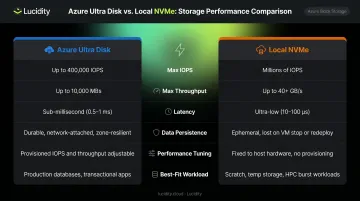
Both storage types use NVMe hardware. The difference is architecture: Ultra Disk abstracts NVMe into a network-attached managed service, while local NVMe connects directly to the VM host — no network hop, which is why raw latency differs.
Ultra Disk lets you adjust IOPS and throughput up to four times within a 24-hour window without detaching the disk or restarting the VM. Local NVMe performance is locked to your VM SKU — resizing the VM is the only lever you have. That operational difference shapes which workloads belong on each storage type, covered in detail below.
What Is Azure Ultra Disk?
Azure Ultra Disk is Microsoft's highest-performance managed disk tier. Its defining characteristic is the decoupling of three provisioning dimensions that were historically tied together on Premium SSDs:
- Capacity: 4 GiB to 64 TiB, adjustable in 1 GiB increments
- IOPS: Up to 1,000 IOPS per GiB, capped at 400,000 IOPS per disk
- Throughput: Up to 10,000 MB/s per disk
You provision each dimension independently. A 1 TiB disk doesn't automatically get a fixed IOPS ceiling; you set it yourself and can change it dynamically as workload demands shift.
Performance and Latency
Microsoft guarantees sub-millisecond latency for Ultra Disk by design. A November 2025 Azure Blog post reported platform enhancements that delivered an 80% reduction in P99.9 and outlier latency, plus a 30% improvement in average latency — closing the gap between remote managed storage and locally attached SSDs for many workloads.
The same update noted up to 50% cost savings for workloads on smaller disks under the revised provisioning model.
Key Constraints to Know
Ultra Disk is powerful, but it comes with hard constraints:
- Cannot be used as an OS disk — Microsoft recommends Premium SSD for the OS disk
- Requires Availability Zone deployment in supported regions
- Does not support disk caching
- Only works with specific VM series (LSv2/Lsv3/Lasv3, DSv3, Esv5, M-series, and others where region/zone support exists)
- Snapshot support is available via Instant Access Snapshots, currently in public preview as of Q4 2025
Cost Structure
Ultra Disk uses three-dimensional billing: you pay for provisioned capacity, provisioned IOPS, and provisioned throughput separately. Sized carefully, it's a cost lever. Sized lazily, it's a budget drain.
- Upside: Scale IOPS up during peak batch processing, dial it back during off-hours
- Risk: Provision for peak and forget to adjust, and you're paying for idle performance headroom
Lucidity's data across 600+ enterprise storage assessments shows average disk utilization before optimization sits around 30% — and Ultra Disk's flexible provisioning model makes it just as prone to waste as any other tier.
What Is Local NVMe Storage in Azure?
Local NVMe in Azure refers to SSDs physically mounted on the same host server as your VM. There's no network path between the VM and the disk — data travels over PCIe via Hyper-V NVMe Direct technology. That's the source of its latency advantage.
Microsoft offers local NVMe on its storage-optimized VM families: Lsv3, Lasv3, and Lsv2. Capacity scales with VM size at 1 x 1.92 TB NVMe device per 8 vCPUs. The largest configurations (L80s_v3 and L80as_v3) provide up to 10 devices / 19.2 TB of local NVMe storage.
The Ephemeral Reality
This constraint catches architects off guard. Local NVMe data:
- Persists across a standard VM reboot
- Does not persist if the VM is deallocated, redeployed, or deleted
That's not a configuration option you can override — it's a fundamental property of physically attached host storage. When the VM leaves that host, the data stays with the hardware.
Workload Fit
Microsoft's official guidance for Lsv3/Lasv3 identifies these VMs as ideal for:
- NoSQL databases — Apache Cassandra, MongoDB
- Big data and analytics — Cloudera, Spark, Elasticsearch
- In-memory caching — Redis
- Data warehousing and large transactional databases
Safe use of local NVMe follows a single architectural rule: pair it with application-level replication. The disk cannot provide durability on its own — that responsibility falls to the application layer, through replication mechanisms like Cassandra's configurable replication factor or HDFS's default 3-replica model.

Azure Ultra Disk vs NVMe: Which Is Better for Your Workload?
Neither is universally better. The right choice comes down to four factors.
Decision Framework
1. Data durability requirement If losing data on VM deallocation is unacceptable, Ultra Disk wins automatically. There's no configuration that makes local NVMe durable at the disk level.
2. Latency profile Ultra Disk guarantees sub-millisecond latency. Local NVMe, with no network hop, achieves lower raw latency — Microsoft describes it as "low latency" via direct host attachment. For workloads where P99.9 latency in the tens of microseconds matters, local NVMe has a structural edge.
3. Performance tunability If your IOPS demand varies — monthly billing runs, quarterly batch jobs, nightly ETL — Ultra Disk's live adjustment capability prevents paying for peak performance 24/7. Local NVMe doesn't offer this; you pay for the full VM SKU regardless of storage utilization.
4. VM portability Ultra Disk can be detached from one VM and attached to another. Local NVMe is inseparable from its host — there's no migration path for the data except application-level replication.
The Cost-Performance Tradeoff
Local NVMe has no separate storage cost. You pay for the VM SKU and get the attached storage included. Ultra Disk charges separately for every dimension — which creates real over-provisioning risk when IOPS and throughput allocations aren't actively managed.
That overprovisioning risk isn't hypothetical. Gartner's research on public cloud storage optimization identifies it as a primary driver of inflated cloud storage costs, alongside poor data lifecycle management. For Ultra Disk specifically: a team that provisions 200,000 IOPS for peak transaction volume but never scales back during off-peak hours pays for unused capacity continuously.
Lucidity's Lumen addresses this by continuously scoring every disk's actual IOPS, throughput, latency, and cost against its provisioned allocation. It surfaces right-sizing recommendations grounded in actual usage data — not estimates. For Ultra Disk's three-dimensional billing model, that kind of visibility is what keeps costs in check.
Situational Recommendations
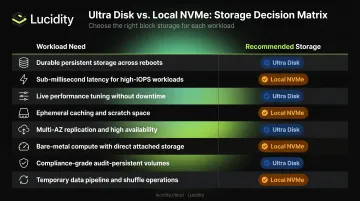
| If you need... | Choose... |
|---|---|
| Durable persistent storage | Ultra Disk |
| Sub-millisecond P99.9 latency | Ultra Disk (improved) or local NVMe |
| Live performance tuning | Ultra Disk |
| Lowest cost for ephemeral workloads | Local NVMe |
| Distributed caching (Cassandra, Redis) | Local NVMe + app-layer replication |
| Portability across VMs | Ultra Disk |
| Big data scratch space | Local NVMe |
| SAP HANA / Oracle / SQL Server logs | Ultra Disk |
The Hybrid Architecture Pattern
Some enterprise teams use both. Local NVMe serves as a high-speed caching tier for hot data; Ultra Disk holds the durable persistence layer. Cassandra deployments on Lsv3 VMs, for example, sometimes pair local NVMe for active compaction and read paths while checkpointing to managed disks for recovery scenarios. The added complexity pays off by delivering local storage latency without compromising durability.
Real-World Validation
BlackRock's Aladdin platform shows what Ultra Disk looks like at the enterprise tier. A September 2025 Microsoft customer story details how Aladdin uses Azure Ultra Disk Storage with M-series VMs for mission-critical performance — a workload where data loss is not a recoverable scenario and latency directly affects financial outcomes.
Conclusion
Azure Ultra Disk and local NVMe solve different problems. They're not competing products so much as complementary options that belong at different layers of your storage architecture.
Ultra Disk fits workloads where durability, live performance tuning, and persistent storage management are requirements you can't work around. Local NVMe fits workloads where raw throughput is the priority and your application already handles durability through replication at the software layer.
The most practical risk for teams adopting Ultra Disk isn't technical — it's financial. Its three-dimensional billing model rewards careful right-sizing and punishes complacency. Provisioning IOPS and throughput based on actual workload analysis, and revisiting those allocations regularly as demands change, is what keeps Ultra Disk cost-effective rather than a source of steady, avoidable overspend.
That right-sizing discipline is difficult to maintain manually, especially as workload patterns shift. Tools like Lucidity's Lumen give FinOps and ITOps teams continuous visibility into actual IOPS and throughput consumption across Azure volumes — so provisioning decisions stay grounded in real usage data rather than worst-case assumptions.
Frequently Asked Questions
Is Azure Ultra Disk built on NVMe hardware?
Ultra Disk is a high-performance SSD-backed managed disk service with sub-millisecond latency guarantees. Microsoft references NVMe-related platform capabilities in its documentation, but abstracts the underlying physical media and form factor — the infrastructure details are not disclosed at the data center layer.
What is the difference between Azure Ultra Disk and local NVMe storage?
Ultra Disk is a durable, managed remote block storage service — data persists across VM lifecycle events including restarts and redeployments. Local NVMe is ephemeral storage physically attached to the VM host; data is lost on deallocation. Both offer extreme performance but serve fundamentally different architectural roles.
When should I use local NVMe instead of Azure Ultra Disk?
Local NVMe is the right choice when the application manages durability through replication — distributed databases and analytics clusters are common examples — and when you need the lowest possible latency without network-attached storage overhead.
Does Azure Ultra Disk support sub-millisecond latency?
Yes. Sub-millisecond latency is a design guarantee for Ultra Disk. Microsoft's November 2025 platform updates delivered an 80% reduction in P99.9 and outlier latency, making it viable for latency-sensitive workloads previously limited to on-premises all-flash arrays.
Can I use Azure Ultra Disk as an OS disk?
No. Ultra Disk is data-disk only. Microsoft recommends pairing it with a Premium SSD for the OS disk.
How can I reduce Azure Ultra Disk costs?
Ultra Disk charges independently for provisioned IOPS and throughput, so right-sizing both to actual workload demand is the primary lever. Azure allows up to four performance adjustments per 24-hour window without a VM restart, so you can scale down during off-peak hours with no downtime.