The problem is that Premium SSD v2's unique architecture comes with backup constraints that catch many teams off guard. Restricted schedule frequencies, snapshot caps, no in-place restore — these aren't minor footnotes. Misconfigure your backup policy and you could face gaps in coverage precisely when you need protection most.
This guide covers why backup matters for Premium SSD v2, the three Azure-native methods available, the key limitations you need to plan around, and how to set up a schedule that balances RPO requirements against snapshot budget.
Key Takeaways
- Premium SSD v2 supports backup via Azure Disk Backup, Azure VM Backup (Enhanced Policy only), and Azure Site Recovery for DR
- Backup frequency is capped at 12-hour or daily — no 1, 2, 4, 6, or 8-hour options
- Snapshot retention is capped at 500 per disk total — Microsoft docs conflict on the policy limit (420 vs. 450), so plan conservatively
- Original-Location Recovery is not supported — all restores create a new disk
- ADE-encrypted disks cannot be backed up with any native Azure backup method
- CMK-encrypted disks are supported, provided the encryption key remains accessible during backup
Why Azure Premium SSD V2 Backup Matters
Premium SSD v2 sits at the top of Azure's managed disk hierarchy. Organizations use it for their most demanding workloads — which means data loss events carry disproportionate consequences.
The Business Risk of Going Unprotected
The IBM Cost of a Data Breach Report 2024 puts the global average breach cost at $4.88M, rising to $6.08M for financial services organizations. Ransomware, accidental deletion, and regional outages don't discriminate by disk tier — but their impact is felt hardest on the workloads with the least tolerance for downtime.
For Premium SSD v2 specifically, the risks compound:
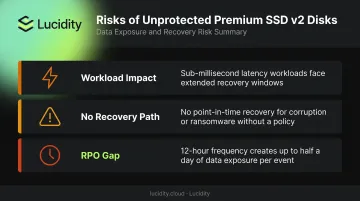
- Sub-millisecond latency workloads (SAP HANA, production SQL) are disproportionately affected by extended recovery windows
- Without a backup policy, there is no point-in-time recovery for data corruption or ransomware rollback
- RPO gaps at 12-hour frequency intervals mean up to half a day of potential data exposure per event
The Compliance Angle
Regulated industries face hard requirements that go beyond general VM protection:
- HIPAA Security Rule: Mandates contingency plans with retrievable exact copies of ePHI
- NIST SP 800-53 Rev. 5 (CP-9): Requires user-level and system-level backups with integrity testing
- FFIEC guidance: Evaluates whether financial institutions can ensure availability of critical services under failure conditions
Block storage protection — not just VM-level snapshots — is increasingly scrutinized during audits.
The Cost Asymmetry
Those audit findings have real dollar consequences. Proactive backup is cheaper than reactive recovery. An IDC study commissioned by Microsoft found that organizations using Azure Backup and Azure Site Recovery achieved 370% five-year ROI and 93% less unplanned downtime. Even accounting for the Microsoft sponsorship, the directional logic holds: incremental snapshot costs are a rounding error compared to rebuilding a failed production workload.
Premium SSD v2 now supports GRS (Geo-Redundant Storage) vaults and Cross-Region Restore for Azure VM Backup in supported regions — making comprehensive backup both achievable and necessary for disaster recovery readiness.
Azure Premium SSD V2 Backup Methods
Three Azure-native approaches protect Premium SSD v2 disks. The right choice depends on your workload structure, retention needs, and DR objectives.
Azure Disk Backup (Standalone Disk Protection)
Azure Disk Backup is an agentless, policy-managed service that automates incremental snapshot creation for individual managed disks. Setup requires no agents, no application changes, and no complex configuration.
Key characteristics:
- Storage location: Snapshots are stored locally as incremental resources — not copied into the vault. The Backup vault serves as the management and policy plane
- Frequency options for Premium SSD v2: 12-hour or daily only
- Restore type: Alternate-Location Recovery only (new disk created)
- Best for: Individual disk protection with fast operational restore
The local snapshot model makes restores quick, but it limits protection against subscription-level events or regional failures. For off-site protection, you need the vault-tier approach below.
Azure VM Backup with Enhanced Policy
Azure VM Backup captures application-consistent incremental snapshots of all disks attached to a VM and transfers them to a Recovery Services vault. For any VM using Premium SSD v2 disks, the Enhanced Policy is required — the Standard backup policy does not support Premium SSD v2.
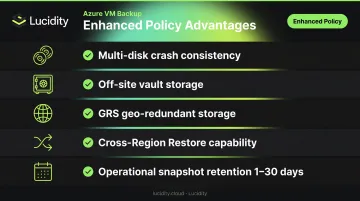
Enhanced Policy advantages over standalone disk backup:
- Multi-disk crash consistency across all VM disks
- Vault storage provides an off-site copy separate from the source subscription
- GRS support for geo-redundant vault storage (in supported regions)
- Cross-Region Restore (CRR) capability for VMs in supported regions
- Operational-tier snapshot retention from 1 to 30 days
To create an Enhanced Policy: Navigate to Recovery Services vault → Backup policies → Add → Azure Virtual Machine → select Enhanced as the policy subtype.
Teams currently on Standard VM Backup policies can migrate to Enhanced Policy. Microsoft documents this migration path, and existing backups are not disrupted during transition.
Azure Site Recovery for Disaster Recovery
Azure Site Recovery (ASR) replicates VMs — including those with Premium SSD v2 disks — to a secondary Azure region via continuous asynchronous replication. It enables automated failover during regional outages, designed to achieve low RTO/RPO for site-level failures.
ASR is a DR complement, not a backup replacement. Each tool addresses a different failure mode — understanding which one to reach for prevents coverage gaps:
| Layer | Tool | Protects Against |
|---|---|---|
| Point-in-time recovery | Azure Backup | Data corruption, ransomware, accidental deletion |
| Site-level continuity | Azure Site Recovery | Regional outages, datacenter failures |
Note: ASR support for Premium SSD v2 disks has region and feature-availability qualifiers in Microsoft documentation. Verify your target region in the Azure-to-Azure support matrix before planning your DR architecture.
Third-Party Backup Solutions
Third-party support for Premium SSD v2 — including tools like Veeam and Rubrik — was not fully verified at publication. Veeam appears in Microsoft Azure blog content covering image-level backups for managed disk scenarios, but vendor documentation confirming explicit Premium SSD v2 support varies. If your organization has existing tooling investments, confirm Premium SSD v2 compatibility directly with your vendor before relying on third-party backup for these disks.
Key Backup Limitations and Constraints
These are the constraints that matter most before you configure a backup policy. Premium SSD v2 behaves differently from Standard HDD, Standard SSD, and even Premium SSD v1 in several important ways.
Backup Frequency Restriction
Standard HDD, Standard SSD, and Premium SSD all support backup intervals of 1, 2, 4, 6, 8, or 12 hours. Premium SSD v2 supports only 12-hour or daily frequency. Teams with sub-12-hour RPO requirements cannot meet that target through Azure Disk Backup alone and should pair standalone disk backup with Azure VM Backup for vault-tier protection.
Snapshot Limits and Retention Math
- Hard limit: 500 snapshots per disk total
- Policy cap: Microsoft documentation shows a conflict — the support matrix states 420 scheduled snapshots; a portal article references 450
Plan conservatively using the lower figure. At 12-hour frequency with a 420-policy cap:
- Maximum retention ≈ 210 days before the snapshot limit is reached
- At daily frequency: approximately 420 days (capped by the 1-year maximum retention)
Balance frequency against retention duration based on your RPO and compliance requirements.
No Original-Location Recovery
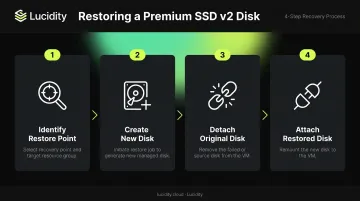
Azure Disk Backup does not support restoring over the source disk. Every restore creates a new disk — either in the original resource group (same-location ALR) or a different one (alternate-location ALR). Build operational runbooks that account for:
- Identifying the restore point and target resource group
- Creating the new disk from the restore job
- Detaching the original (or failed) disk
- Attaching and remounting the restored disk to the VM
Encryption Constraints
- ADE-encrypted disks: Not supported by Azure Disk Backup
- CMK-encrypted disks: Supported, but the Disk Encryption Set Key Vault key must remain active and accessible at restore time
- Cross-subscription restore: Blocked for CMK-encrypted disks
Scope and Subscription Rules
- The Backup vault and source disk must be in the same region
- Snapshots must reside in the same subscription as the source disk
- Azure Lighthouse is not supported — cross-tenant backup and restore management is not available for Azure Disk Backup
Operational Visibility Challenge
With large disk estates, tracking which Premium SSD v2 disks are actively used versus idle becomes its own problem. Backing up unattached or zero-I/O disks generates unnecessary snapshot costs — and those disks won't appear in Azure's native monitoring views.
Lucidity's Lumen product identifies four categories of idle disks — unattached, reserved, unmounted, and zero-I/O — giving teams a clear picture of what's actually active. That lets you concentrate backup coverage on production disks and stop paying for snapshots on storage that isn't serving any workload.
Azure Premium SSD V2 Backup Schedule and Retention Guidelines
The 12-hour frequency cap is your starting constraint. Schedule decisions from there should reflect workload criticality, RPO tolerance, and snapshot budget.
Recommended Framework by Workload Type
| Workload Type | Frequency | Retention | Vault Tier |
|---|---|---|---|
| Mission-critical (SAP HANA, prod SQL) | 12-hour | ~180–210 days operational | Yes — Enhanced Policy VM Backup for long-term |
| Standard production | Daily | 30–90 days | Yes — vault backup for compliance retention |
| Dev/test / non-production | Evaluate first | Minimal or none | Typically not required |
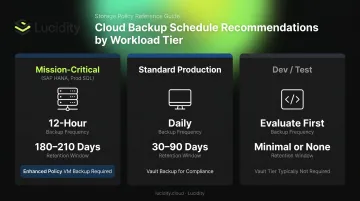
For mission-critical workloads, 12-hour disk backup should be paired with Azure VM Backup (Enhanced Policy) to get vault-tier storage and cross-region restore capability. Standalone disk backup alone does not provide an off-site copy.
Before You Build a Policy: Audit First
Before committing any disk to a backup schedule, identify which disks actually need coverage. Lucidity's free Assessment tool scans your Azure disk estate without agents and surfaces utilization, idle status, and waste data not visible in Azure's native console — including IOPS, throughput, and attachment history per volume.
Identifying zero-I/O or unattached disks before configuring backup policies avoids paying snapshot costs for storage that isn't serving production workloads. Across hundreds of assessments, the average enterprise shows roughly 30% disk utilization, meaning a significant portion of any fleet may not warrant backup at all.
Policy Migration Note
Teams on Standard VM Backup policies need to migrate to Enhanced Policy before Premium SSD v2 disks are covered. This migration is documented by Microsoft and does not disrupt existing backups in progress. Bulk migration is supported, making it practical for large VM fleets.
Frequently Asked Questions
What backup frequency is supported for Azure Premium SSD v2 disks?
Azure Disk Backup supports only 12-hour or daily frequency for Premium SSD v2 disks. Standard HDD, Standard SSD, and Premium SSD support shorter intervals (1, 2, 4, 6, 8 hours), but these options are not available for Premium SSD v2 or Ultra Disks. Factor this 12-hour minimum into your RPO planning.
Do I need the Enhanced Policy to back up VMs using Premium SSD v2 disks?
Yes — the Standard backup policy does not support Premium SSD v2 or Ultra Disks. An Enhanced Policy must be in place for Azure VM Backup to protect these disks. Microsoft documents the migration path from Standard to Enhanced Policy, and it does not disrupt existing backup jobs.
Can Azure Disk Backup restore a Premium SSD v2 disk to its original location?
No. Original-Location Recovery (OLR) is not supported. All restores create a new disk — either in the same resource group as the source disk or in an alternate resource group. Teams need runbooks that cover detaching the source disk and reattaching the restored one.
How many snapshots can be retained for an Azure Premium SSD v2 disk?
The hard limit is 500 snapshots per disk. Policy-scheduled backups are capped at either 420 or 450 depending on which Microsoft documentation you reference; plan around 420 to stay conservative. At 12-hour frequency, that translates to approximately 210 days of retention before the limit is reached.
Can ADE-encrypted or CMK-encrypted Premium SSD v2 disks be backed up?
ADE-encrypted disks are not supported by Azure Disk Backup. CMK-encrypted disks are supported, but the Disk Encryption Set Key Vault key must remain active and accessible at restore time. Cross-subscription restore is not available for CMK-encrypted disks.
Does Azure Backup support cross-region restore for Premium SSD v2 disks?
Cross-Region Restore is supported for Azure VM Backup using GRS-enabled Recovery Services vaults, provided the VM's region is on Microsoft's supported list. Standalone Azure Disk Backup stores snapshots locally; cross-region restore requires manually copying snapshots to another region.
Conclusion
Azure Premium SSD v2 backup is not optional for production workloads. The disk is purpose-built for mission-critical data, and that's precisely what makes unprotected disks high-risk.
The most defensible approach layers three methods:
- Azure Disk Backup for operational, fast-restore snapshot protection at the individual disk level
- Azure VM Backup with Enhanced Policy for multi-disk consistency, vault-tier off-site storage, and long-term retention
- Azure Site Recovery for regional failover and site-level DR continuity
Schedule and retention decisions should be driven by your RPO requirements and the snapshot math — not defaults.
Backup coverage is half the equation. The other half is knowing which disks in your fleet actually warrant it. Lucidity's platform gives you real-time visibility across your entire Azure disk estate, surfacing IOPS, utilization trends, and idle disk classifications so you can make coverage decisions based on actual usage — not assumptions. That visibility is what keeps your backup strategy from becoming another source of unnecessary cloud spend as your disk fleet grows.