Introduction
Azure Premium SSD v2 now spans over 30 regions globally — including recent additions like US Gov Arizona and South India — giving enterprise teams running IO-intensive workloads on Azure VMs more deployment options for high-performance block storage than ever before.
Wider availability also creates new decisions. Which regions support Availability Zones, and which don't? What limitations apply before you commit to v2 for production? And as adoption grows across more regions and workload types, how do you keep storage costs from quietly expanding alongside it?
This post gives you the practical answers you need to deploy confidently — regional availability, key limitations, performance specs, HA configurations, and cost controls for teams operating at scale.
Key Takeaways
- Premium SSD v2 is available in 50+ Azure regions as of 2026, including new non-AZ additions like US Gov Arizona and South India
- Data disk only — cannot be used as an OS disk or with Azure Compute Gallery
- Performance scales to 80,000 IOPS and 2,000 MB/s, adjustable up to four times per 24-hour window
- In AZ-supported regions, v2 disks must attach to zonal VMs — zone must be set at VM creation
- Over-provisioned v2 disks incur costs even at zero I/O — right-sizing at scale requires automation
What Is Azure Premium SSD v2?
Premium SSD v2 is Microsoft's managed disk type built for production-grade, IO-intensive workloads. It delivers sub-millisecond latency and granular performance tuning at a lower cost than Ultra Disks.
Workloads it's designed for:
- SQL Server, Oracle, MariaDB, SAP
- Cassandra, MongoDB
- Big data and analytics pipelines
- Gaming, running on VMs or stateful containers
The key difference from Premium SSD v1 isn't just performance — it's the provisioning model. With v1, you pick a disk size and get a fixed IOPS/throughput tier. With v2, capacity, IOPS, and throughput are configured independently — you set exactly what you need and pay only for what you provision.
That distinction matters in practice. A database handling heavy transaction volume during business hours but near-idle overnight can be tuned to match each phase, without a maintenance window or a disk swap.
Azure Premium SSD v2: 2026 Regional Availability
As of 2026, Premium SSD v2 is available across an expanding set of Azure regions. The full list evolves frequently, so check the Microsoft Azure Updates page for the latest additions.
AZ-Supported vs. Non-AZ Regions
Premium SSD v2 operates under two availability models:
- AZ-supported regions: Disk must be attached to a zonal VM. The disk is collocated with the VM in the same availability zone.
- Non-AZ regions: Disk can be used without infrastructure redundancy requirements, but Microsoft notes these regions may experience slightly higher average latency.
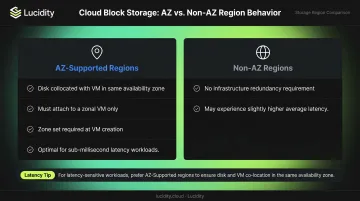
For latency-sensitive workloads, that second point matters. If your application has strict sub-millisecond requirements, an AZ-supported region is the safer choice architecturally.
Recent 2026 Additions
Two non-AZ region additions are worth highlighting:
- US Gov Arizona now supports Premium SSD v2, extending high-performance block storage to sovereign government environments for agencies and contractors with data residency requirements.
- South India joins the APAC roster, expanding enterprise production workload options alongside the existing AZ-supported Central India region.
Checking Availability Programmatically
Since availability shifts as Microsoft expands coverage, teams automating multi-region deployments shouldn't hardcode region assumptions. Use these commands to verify current state before deployment:
Azure CLI:
az vm list-skus --resource-type disks \
  --query "[?name=='PremiumV2_LRS'].{Region:locationInfo[0].location, Zones:locationInfo[0].zones}"
PowerShell:
Get-AzComputeResourceSku | Where-Object {
  $_.ResourceType -eq 'disks' -and $_.Name -eq 'PremiumV2_LRS'
} | Select-Object Location, Restrictions
Both commands return zone availability per region — the authoritative source for any deployment decision.
Understanding the Limitations of Premium SSD v2
Premium SSD v2 has specific constraints that affect architecture decisions. Getting these wrong early costs time.
OS Disk and Compute Gallery Restrictions
Premium SSD v2 cannot be used as an OS disk and cannot be used with Azure Compute Gallery. It is a data disk only.
In practice, this means pairing Premium SSD v2 data disks with a Premium SSD OS disk for every VM in the deployment. Factor this into your disk SKU mix when estimating costs and configuring VM profiles.
Zonal VM Requirement
In AZ-supported regions, Premium SSD v2 disks can only attach to zonal VMs. The availability zone must be set at VM creation. You cannot assign a zone to an existing VM after the fact and then attach Premium SSD v2 disks.
This catches teams off guard more than any other limitation. If a VM was deployed without a zone specified, two paths exist:
- Recreate the VM with a zone defined
- Accept the non-AZ configuration where the region supports it
Host Caching
Premium SSD v2 does not support host caching. For teams migrating from Premium SSD v1 workloads that relied on read caching to boost performance, this is worth re-evaluating. Given v2's sub-millisecond latency baseline, many workloads that previously depended on host caching no longer need it at the v2 performance level.
Performance Capabilities of Azure Premium SSD v2
IOPS and Throughput Model
Every Premium SSD v2 disk includes a baseline at no extra charge:
- 3,000 IOPS — included free
- 125 MB/s throughput — included free
Beyond 6 GiB, performance scales as follows:
| Metric | Scaling Rule | Maximum |
|---|---|---|
| IOPS | +500 IOPS per GiB | 80,000 IOPS |
| Throughput | +0.25 MB/s per provisioned IOPS | 2,000 MB/s |
| Minimum for max IOPS | 160 GiB disk | 80,000 IOPS |
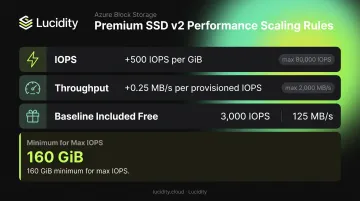
Example: A 500 GiB disk can support up to 80,000 IOPS (capped at the ceiling regardless of size beyond 160 GiB) and up to 2,000 MB/s throughput when IOPS is configured at 5,000 or higher. A 50 GiB disk supports up to 25,000 IOPS — calculated as (50 - 6) × 500 + 3,000 — with throughput scaling at 0.25 MB/s per provisioned IOPS from that point.
Capacity and Quotas
Capacity and billing scale together in 1-GiB increments:
- Ranges from 1 GiB to 64 TiB
- Billed per GiB provisioned
- Default quota: 100 TiB per region per subscription
- Higher limits available via quota request
Performance Adjustment Rules
IOPS, throughput, and capacity can be adjusted up to four times in any 24-hour period. Disk creation counts as one of those four adjustments.
Plan initial configuration carefully — if you expect to tune performance after provisioning, don't exhaust your remaining three same-day adjustments during setup.
Sector Size
- 4k physical sector size is the default
- 512E emulation is available for legacy workloads
Oracle Database versions below 12.2 require a 512-byte sector size. If you're running legacy Oracle deployments, 512E is mandatory — not a preference.
High Availability Configurations with Premium SSD v2
Single VM SLA
A VM using a Premium SSD OS disk paired with Premium SSD v2 data disks qualifies for Azure's highest single-VM uptime SLA. Microsoft recommends this configuration for maximum single-instance availability — check the Azure SLA documentation for the current SLA percentage applicable to your region.
Availability Zones
For multi-VM deployments, distributing across three availability zones provides the strongest resilience against zone-level failures. Premium SSD v2 disks are collocated with their parent VM within the same zone, so a zone outage affects only that zone's VMs — leaving the rest of your deployment intact.
Availability Set Support
As of 2025/2026, Premium SSD v2 can be used with VMs in availability sets in select regions that lack AZ support:
- Australia Southeast, Canada East, North Central US, UK West, West Central US, West US
This requires registering for the PV2WithAVSetRegionWithoutZone feature flag on your subscription. Once registered, Azure automatically aligns disk fault domains with compute fault domains. One caveat: if a disk and VM land in mismatched fault domains initially, Azure triggers a background alignment copy that can take up to 24 hours. Disk size increases are blocked for the duration of that window.
What Availability Zones and Sets Don't Cover
Regional Virtual Machine Scale Sets — meaning scale sets without explicitly defined availability zones — do not support Premium SSD v2. Teams using VMSS in this configuration have two options:
- Pin zones explicitly on the scale set to meet the Premium SSD v2 requirement
- Switch to a compatible disk type (such as Premium SSD v1) for that workload
Optimizing Your Premium SSD v2 Footprint at Scale
The Over-Provisioning Problem
Premium SSD v2's independent IOPS and throughput provisioning is genuinely flexible — but that flexibility cuts both ways. Teams routinely configure for peak load and never dial back, which means over-provisioning is easy to accumulate and hard to catch.
According to the FinOps Foundation's 2026 State of FinOps report, workload optimization and waste reduction is the single top priority for FinOps teams, representing over $83 billion in annual cloud spend surveyed. Storage consistently ranks as one of the least-optimized resource categories, with most organizations maintaining only basic optimization practices compared to compute.
The numbers inside enterprise environments reflect this. Lucidity's analysis across 600+ cloud assessments covering 100+ petabytes of storage finds that the average enterprise runs at roughly 30% disk utilization before optimization. That means over two-thirds of provisioned capacity — along with the IOPS and throughput attached to it — sits unused.
Right-Sizing Without Manual Overhead
Premium SSD v2 technically allows you to adjust IOPS and throughput four times per 24-hour window without downtime. That's a real lever, but using it manually across tens or hundreds of volumes requires constant monitoring, engineering time, and the discipline to actually follow through — which rarely happens.
Lucidity Lumen provides real-time visibility into disk utilization across Azure environments — including Premium SSD v2 — continuously scoring every disk against actual IOPS, throughput, latency, and cost patterns. It identifies over-provisioned disks, surfaces tier optimization recommendations, and executes changes without agents or infrastructure modifications. Teams deploying Lucidity have reduced cloud storage spend by up to 70%, with documented results like Dometic achieving a 52% reduction in storage costs.
The Idle Disk Problem
Premium SSD v2 disks that are unattached or running at zero I/O still incur provisioning costs. As v2 adoption grows across more regions and workload types, the population of idle disks grows with it.
Lucidity Lumen identifies four distinct idle disk types that native Azure tooling often misses:
- Unattached — disks with no VM attached
- Reserved — allocated but inactive
- Unmounted — attached to a VM but not mounted in the OS
- Zero-I/O — mounted and attached, but recording no activity
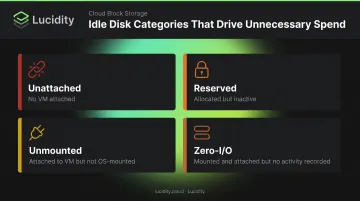
These four categories can represent a substantial share of total block storage spend. Regular audits — or better, automated detection — should be part of any team's Premium SSD v2 management practice at scale.
Frequently Asked Questions
Which Azure regions support Premium SSD v2 in 2026?
Premium SSD v2 is available in 50+ Azure regions as of 2026, spanning both AZ-supported regions and non-AZ regions including US Gov Arizona and South India. The list is actively growing — check the Azure managed disk types page or Azure Updates for the current full list.
Can Azure Premium SSD v2 be used as an OS disk?
No. Premium SSD v2 is a data disk only and cannot be used as an OS disk or with Azure Compute Gallery. Pair it with a Premium SSD OS disk when deploying VM configurations that use Premium SSD v2 for data workloads.
What is the difference between Azure Premium SSD and Premium SSD v2?
Premium SSD v2 has no fixed tier sizes — you independently configure IOPS, throughput, and capacity, versus v1's bundled tiers. It delivers lower latency and a higher IOPS ceiling (80,000 vs. 20,000), making it more cost-efficient when workloads need to tune performance independently.
Does Azure Premium SSD v2 work with availability sets?
Yes, in select non-AZ regions (Australia Southeast, Canada East, North Central US, UK West, West Central US, West US) after registering the PV2WithAVSetRegionWithoutZone feature flag. Azure automatically aligns disk and compute fault domains — allow up to 24 hours if domains are initially mismatched.
How many times can you adjust Premium SSD v2 performance settings per day?
Up to four times in any 24-hour window. Disk creation counts as one of those four adjustments, leaving three remaining changes available that day. Plan initial settings carefully to preserve adjustment headroom.
What workloads are best suited for Azure Premium SSD v2?
IO-intensive production workloads — databases like SQL Server, Oracle, SAP, Cassandra, and MongoDB, plus big data and gaming. It's especially well-matched to workloads with variable performance demands, since IOPS and throughput can be tuned dynamically without downtime.