Introduction
For years, organizations running high-IOPS workloads on Azure faced an awkward tradeoff: use Premium SSD v2 disks for the performance their SAP HANA, SQL Server, or Oracle databases demanded, or have a proper disaster recovery path. They couldn't fully have both.
Azure Site Recovery (ASR) has long handled DR for Azure VMs, but Premium SSD v2 disks were a blind spot. Snapshot-based point-in-time recovery existed, but continuous replication with automated failover orchestration — the kind that actually meets enterprise RPO requirements — wasn't available for Pv2 workloads. That gap is now closed.
ASR support for Premium SSD v2 disks reached general availability in Q4 2025, as confirmed in Microsoft's Disk Storage documentation. This guide is for DevOps, ITOps, and FinOps teams building or validating their DR strategy. It covers:
- What changed with ASR's Pv2 support and why it matters
- How the replication integration works under the hood
- Where the technical gotchas are
- What it costs
Key Takeaways
- ASR for Premium SSD v2 is generally available as of Q4 2025 for Azure-to-Azure scenarios
- Replica disks use Premium SSD v1 during replication; Pv2 target disks are created at failover
- Capture IOPS configuration before enabling replication — changes afterward require manual updates post-failover
- High Churn mode is mandatory for Pv2, requiring a Premium Block Blob cache storage account
- Audit your disk estate before enabling replication; idle or zero-I/O Pv2 disks waste replica storage budget
What Is Premium SSD v2 and Why Does DR Matter Here?
Understanding Pv2's Unique Architecture
Premium SSD v2 is Azure's next-generation managed disk type, designed for workloads that need sub-millisecond latency and consistent, high throughput. The key architectural difference from Premium SSD v1: capacity, IOPS, and throughput are configured independently rather than being locked to fixed performance tiers. You're not forced to overprovision capacity just to get the IOPS your database needs.
Official Microsoft workload targets for Pv2 include:
- SQL Server and Oracle transactional databases
- SAP and MariaDB workloads
- Cassandra and big data analytics
- High-throughput gaming backends
For these workloads, restoring from a daily snapshot isn't an acceptable DR answer. A major outage for any of them carries serious business consequences. Uptime Institute's 2026 outage analysis found that 57% of respondents' most recent major outage cost more than $100,000, with 1 in 5 exceeding $1 million. That exposure is exactly what the absence of a continuous replication path left unaddressed.
The DR Gap That Existed
Before ASR support, Pv2 disks had no continuous, automated replication path native to Azure. Incremental snapshots provided point-in-time recovery, but snapshot intervals mean data loss windows — not a defensible position for a production SQL Server or SAP HANA environment.
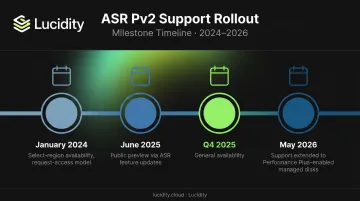
The timeline of how this changed:
- January 2024: Select-region/request-access availability
- June 2025: Public preview via ASR feature updates
- Q4 2025: General availability
- May 2026: ASR support extended to Performance Plus–enabled managed disks
As of general availability, this is a production-ready feature with no preview caveats.
How ASR Works with Premium SSD v2 Disks
Core Replication Mechanics
ASR provides continuous replication for Azure VMs between Azure regions (Azure-to-Azure, or A2A). Key SLA commitments to know:
- Recovery points generated on a crash-consistent basis every 5 minutes
- "Latest" recovery option processes pending data before failover to minimize data loss
- Microsoft's documented RTO SLA: 1 hour
RPO and RTO SLAs are identical for Premium SSD v2 and v1 disk types. However, Pv2 disks take longer to complete initial enable-protection than v1 — so schedule that process outside critical change windows.
Replica Disk Architecture
Get this wrong and your DR costs and recovery behavior won't match expectations.
During steady-state replication:
- Source Pv2 disks replicate using Premium SSD v1 replica disks in the target region
- Source uses Standard Page Blob snapshots for recovery points
- Target uses Premium Snapshots for recovery points
At failover:
- New Premium SSD v2 target disks are created from the replica
- A brief data hydration period occurs before the Pv2 disk reaches full performance
- Availability is not impacted by hydration — only time-to-peak-performance
Cost implication: Your steady-state replica storage cost is Premium SSD v1 pricing, not Pv2. Budget accordingly.
One critical operational warning: never manually delete snapshots that ASR manages. Microsoft explicitly states this forces a full resync of the replica — costly, disruptive, and entirely preventable.
IOPS Configuration and Cache Requirements
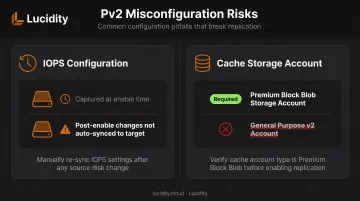
These two Pv2-specific behaviors are the most common sources of misconfiguration in real deployments:
IOPS capture at enable-replication time ASR copies the source Pv2 disk's IOPS configuration at the moment replication is enabled. Any IOPS changes made to the source disk after that point are not automatically reflected in the failover disk. If you scale up IOPS on your production database, you must manually update the target disk configuration after a real failover.
Cache storage account requirement Pv2 disks default to High Churn mode in ASR. High Churn mode requires a Premium Block Blob storage account in the source region — not a General Purpose v2 account. Using the wrong account type causes configuration errors — and it's the setup mistake teams run into most often.
Critical Limitations Before Enabling Replication
Technical Constraints to Know
| Scenario | Behavior |
|---|---|
| Sector sizes | Both 512-byte and 4096-byte sector sizes are supported |
| Live disk resize | Triggers replica resync; all older recovery points are deleted |
| Shared disks (WSFC) | Supported for Windows only; all cluster VMs must be selected together |
| Linux shared disks | Not supported |
| Disk exclusion | Supported at setup via PowerShell |
| New disks added post-setup | Must explicitly enable replication for each new disk |
| Hot disk removal | Not supported; requires disabling and re-enabling full VM replication |
Live Resize and Recovery Point Gap
After a live resize completes, ASR resyncs the replica and deletes all existing recovery points. New recovery points only begin generating once resync finishes. Schedule any Pv2 disk resizes during low-risk windows where a temporary recovery point gap is acceptable.
The Hidden Cost of Replicating Idle Disks
When enabling ASR for VMs with multiple attached Pv2 disks, teams often replicate everything — including disks that haven't seen meaningful I/O in months. Each replicated disk incurs replica storage costs, snapshot costs, and cache storage overhead, regardless of whether it serves any production purpose.
Audit which disks are genuinely active before enabling replication. Lucidity's Lumen identifies four categories of idle Azure disks — unattached, reserved, unmounted, and zero-I/O — that don't surface in native Azure dashboards, so you protect only the storage that actually matters. Lucidity's free Assessment tool can scan your Azure disk estate in approximately 5 minutes with no agents or infrastructure changes required.
Understanding the Cost Structure
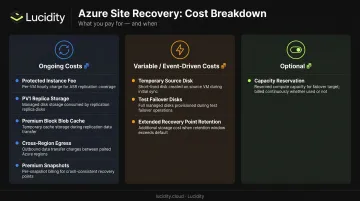
ASR for Pv2 has several cost layers. There's no single line item — costs accumulate across multiple dimensions:
Ongoing costs:
- Protected Instance fee — per VM, after the first 31 days (new instances are free for 31 days)
- Premium SSD v1 replica storage — steady-state replica disks in target region
- Premium Block Blob cache storage — required for High Churn; sized by data churn rate
- Cross-region network egress — ASR compresses replication data before transfer, with up to 50% compression on differential data
- Premium Snapshots — target recovery points, billed by consumed capacity
Variable/event-driven costs:
- Temporary source disk — created during initial replication, same SKU as source, charged only for the duration
- Test failover disks — snapshots stored as new target disks; costs persist until you clean them up
- Extended recovery point retention — holding 3 days of recovery points costs more than 1 day; plan retention based on actual RPO requirements
Optional but relevant:
- Capacity Reservation — guarantees compute capacity in the target region at failover. Billed continuously at the underlying VM size rate, whether or not you're actively using it. Worth modeling for mission-critical Pv2 workloads where failover capacity must be guaranteed.
Once you've mapped which cost categories apply to your setup, run the numbers against your specific regions and disk configurations using the Azure Pricing Calculator. Pricing varies by region and shifts over time, so any static figures in a guide will go stale quickly.
How to Enable ASR for Pv2 VMs
Prerequisites Checklist
Before starting, confirm:
- Recovery Services Vault exists in the target region (source and vault regions must differ)
- Premium Block Blob storage account created in the source region for cache
- VM's source region supports Pv2 ASR — verify against the Azure-to-Azure support matrix
- IOPS configuration on all Pv2 disks is finalized (changes after enablement won't auto-sync to target)
Enablement Steps
- Navigate to Recovery Services Vault → select the source VM → click Enable Replication
- Configure target settings — target region, resource group, virtual network
- Specify cache storage account — must be Premium Block Blob; ASR will default Pv2 to High Churn automatically, but verify in the Replication Settings tab
- Review disk settings — exclude any disks via PowerShell if needed; confirm which disks will be replicated
- Enable replication and monitor the initial sync job via Site Recovery Jobs
Pv2 disks take longer than Standard SSD v1 to complete initial protection — a slower sync is normal, not a failure signal. Once the initial sync finishes and recovery points start generating, move on to validation.
Post-Setup Validation
Once recovery points begin generating:
- Run a test failover to confirm the DR configuration works — new target storage disks are created from snapshots during this process
- Clean up test failover resources as soon as you're done; they persist and accrue costs until manually removed
- Record your source Pv2 IOPS settings now — after a real failover, you'll need to reapply them to target disks manually
Frequently Asked Questions
Is Azure Site Recovery for Premium SSD v2 disks generally available?
Yes. ASR for Premium SSD v2 reached general availability in Q4 2025, following limited region availability in January 2024 and public preview in June 2025. It is available for Azure-to-Azure replication scenarios.
What disk type does ASR use for replica disks when the source is Premium SSD v2?
ASR uses Premium SSD v1 disks as replica disks during ongoing replication. When failover occurs, new Premium SSD v2 target disks are created from the replica, with a brief hydration period before full performance is reached.
Does ASR preserve the IOPS configuration of a Premium SSD v2 disk after failover?
ASR captures the IOPS configuration at the time replication is enabled and applies it to the failover disk. Any IOPS changes made to the source disk after that point are not automatically reflected and must be manually applied to the target disk after failover.
What cache storage account type is required for ASR with Premium SSD v2?
A Premium Block Blob storage account in the source region is required. Pv2 disks use High Churn mode by default, which is incompatible with General Purpose storage accounts. Using a standard account will cause configuration errors.
Can I live resize a Premium SSD v2 disk protected by ASR?
Live resize is supported, but it triggers a replica resync and deletes all existing recovery points. New recovery points begin generating only after resync completes, so schedule resizes during low-risk windows.
Are there sector size restrictions for Pv2 disks in ASR?
Both 512-byte and 4096-byte sector sizes are supported. Check your disk's sector size before enabling replication to ensure ASR is correctly configured for it.