Introduction
Not all data deserves the same storage. A transaction database queried thousands of times per second has entirely different needs than a compliance archive that hasn't been touched since last quarter — yet many organizations run both on the same premium storage tier. The result: inflated cloud bills and wasted capacity on workloads that don't need premium performance — while the ones that do get no advantage from it.
According to Flexera's 2026 State of the Cloud report, estimated wasted public cloud IaaS/PaaS spend sits at 29% — and storage over-provisioning is a primary driver. Organizations default to high-performance storage "just in case," treating every gigabyte as mission-critical when most isn't.
Automated disk tiering was designed to break this pattern. But its internal logic is widely misunderstood — leading to misconfigured policies, missed savings, and false confidence that data placement alone solves cloud storage waste.
This guide breaks down how automated disk tiering actually works, why misconfiguration is so common, and what it takes to make tiering decisions that hold up under real workload conditions.
Key Takeaways
- Automated disk tiering moves data between storage tiers (fast/expensive to slow/cheap) based on access frequency, without manual intervention.
- Data is classified as hot, warm, or cold — a policy engine monitors I/O patterns and triggers migration automatically.
- Block-level tiering is most relevant for cloud infrastructure teams managing persistent volumes (vs. file or object storage).
- The primary goal is cost-performance balance: keep active data on high-performance storage, move inactive data to cheaper tiers automatically.
- Tiering manages data placement. It does not solve capacity over-provisioning or volume right-sizing — those require a separate management layer.
What Is Automated Disk Tiering?
The Storage Networking Industry Association (SNIA) defines tiered storage as "storage physically partitioned into multiple distinct classes based on price, performance, or other attributes, where data may be dynamically moved among classes." Automated disk tiering is the mechanism that automates this movement without human intervention.
Why It Exists
The core trade-off driving tiered storage is straightforward:
- Fast storage (NVMe SSDs, high-IOPS cloud block volumes like AWS io2 at $0.125/GB-month) delivers low latency but costs significantly more
- Slow storage (standard HDDs, cold cloud tiers) costs far less — AWS sc1 Cold HDD runs $0.015/GB-month — but can't support latency-sensitive workloads
- Without tiering, organizations either overspend on premium storage for data that doesn't need it, or accept performance hits by placing active workloads on budget media
Automated tiering keeps expensive storage reserved for data that genuinely earns it.
What Automated Disk Tiering Is NOT
These distinctions matter for setting the right expectations:
- Unlike manual tiering, where an admin migrates data on a fixed schedule, automated tiering runs continuously based on policy — no human trigger required.
- Unlike caching, which creates a temporary copy in fast memory, tiering moves the original data. SNIA defines cache as expedited access via duplication; tiering is relocation.
- Unlike storage provisioning, which governs how much storage is allocated, tiering only controls where data lives within that allocation — it won't shrink an over-provisioned volume.
Three Types of Automated Tiering
| Type | What moves | Where it's used |
|---|---|---|
| Block-level | Individual data blocks | SANs, cloud block storage (EBS, Persistent Disk) |
| File-level | Entire files | NAS environments |
| Object-level | Objects via metadata/lifecycle policies | Cloud object storage (S3, Azure Blob, GCS) |
Block-level tiering offers the finest granularity — moving data at the sub-file level as access patterns shift. For cloud infrastructure teams managing persistent volumes on AWS, Azure, or Google Cloud, this is typically the most relevant type, and understanding how it works mechanically is where the real optimization decisions begin.
How Does Automated Disk Tiering Work?
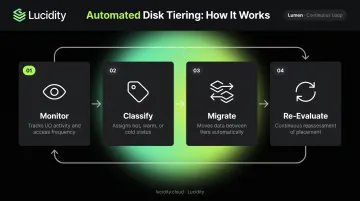
Automated disk tiering runs as a continuous cycle: monitor, classify, assign, migrate, then re-evaluate. Understanding each stage clarifies where the real value — and the real risk — lives.
Monitoring and Data Classification
The system continuously tracks I/O activity — read/write frequency, recency of access, data age, and modification history — to classify data as hot, warm, or cold. This monitoring is always on, not a scheduled batch job.
One critical dependency: the observation window determines decision quality. A system watching only 24 hours of access patterns may misclassify data with legitimate but irregular access spikes. AWS Compute Optimizer, for reference, analyzes EBS volume utilization over the last 14 days by default, or up to 93 days with enhanced metrics — reflecting the real trade-off between responsiveness and accuracy.
Policy Engine and Tier Assignment
IT teams configure thresholds that determine when data qualifies for promotion (to a faster tier) or demotion (to a slower one). Policies can be based on:
- Access frequency and recency
- Data age or file type
- Application tag or business priority
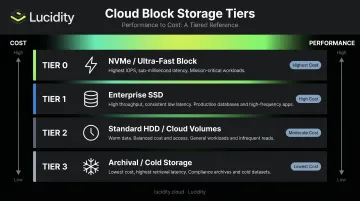
Those thresholds map to a defined tier structure. Most real-world deployments use 2–3 tiers rather than the full four-level model:
- Tier 0 — NVMe/ultra-fast storage for mission-critical applications
- Tier 1 — Enterprise SSD, high-performance, active workloads
- Tier 2 — Standard HDD or standard cloud volumes, warm/periodic-access data
- Tier 3 — Archival/cold storage, rarely accessed data with flexible retrieval times
Once a data block's usage metrics cross a policy threshold, the tiering engine flags it and executes the move — either immediately or during a scheduled window — without interrupting running applications.
Data Migration and Ongoing Optimization
Two approaches handle the actual movement:
Migration-based tiering physically moves data to a new storage medium. Once cold, it leaves the fast tier entirely. This is the more common form of true tiering.
Cache-based tiering promotes hot data to a fast cache as a copy. When access drops, the cache entry clears without additional disk I/O — the original always stays on slower media.
In a well-tuned deployment, high-performance tiers hold actively accessed data while cold tiers absorb aging datasets. The practical result: lower cost per workload and faster average I/O for the applications that actually need it.
Where Automated Disk Tiering Is Used
Cloud Object Storage: The Mature Case
For object storage, cloud-native tiering is well-developed across all three major providers:
- AWS S3 Intelligent-Tiering monitors access patterns and moves objects to lower-cost tiers automatically. Objects shift to Infrequent Access after 30 days without access and to Archive Instant Access after 90 days. AWS reports S3 Intelligent-Tiering has saved customers more than $6 billion since its 2018 launch — with named customers like Electronic Arts reducing data lake costs by 30% and Zalando saving 37% annually.
- Azure Blob lifecycle management uses JSON rules to transition blobs based on creation time, last modified time, and last accessed time.
- GCP Cloud Storage Autoclass transitions objects based on individual access patterns — a read moves an object to Standard; inactivity moves it toward Nearline after 30 days and Coldline after 90 days.
Cloud Block Storage: A Different Story
Block storage tiering is far more limited. Unlike object storage, every provider requires manual intervention to change volume types:
- AWS EBS: Requires an explicit modification request; no automatic transitions occur
- Azure: Allows tier changes via portal or CLI, but downgrades are restricted to once every 12 hours
- GCP Persistent Disk: Requires stopping the VM, creating a snapshot, and attaching a new disk
That friction reveals where tiering alone falls short. Block storage volumes attached to running workloads often go unexamined, even when object storage is perfectly optimized.
According to Lucidity's analysis of 600+ enterprise storage assessments covering over 100PB of storage, those volumes sit at roughly 30% average disk utilization. That underutilization is the capacity problem tiering doesn't touch.
Challenges of Automated Disk Tiering
Understanding the failure modes helps avoid them.
Policy Misconfiguration
This is the most common problem. Set thresholds too aggressively and data moves too frequently — generating excessive migration I/O that degrades performance during movement. Too conservative, and cold data never demotes, leaving cost savings on the table. Getting policies right requires ongoing tuning as workload patterns evolve.
Unpredictable Workloads
Automated tiering assumes access patterns are reasonably stable. Bursty workloads — month-end financial reporting, seasonal e-commerce traffic peaks — can push data to cold storage right before a sudden access surge. The result: latency spikes precisely when performance matters most.
Both AWS and GCP provide mechanisms to re-promote accessed data (S3 Intelligent-Tiering returns objects to Frequent Access when read; GCP Autoclass moves read objects back to Standard), but deep archive classes still introduce rehydration constraints.
Hidden Costs in Cloud Object Storage
A few operational details that catch teams off guard:
- AWS S3 objects smaller than 128 KB are not auto-tiered by S3 Intelligent-Tiering
- Lifecycle transitions carry per-request costs — for example, $0.01 per 1,000 requests to S3 Standard-IA
- Azure lifecycle processing can take multiple days depending on account workload; the service prioritizes active workloads over lifecycle runs
- Azure archive blobs cannot be rehydrated to an online tier by lifecycle policies — that requires a separate operation
The Capacity Problem Tiering Doesn't Solve
Automated tiering optimizes where data lives — but it doesn't shrink over-provisioned volumes, identify idle disks, or right-size storage allocations. An organization running Tier 1 SSD volumes at 30% utilization saves nothing from tiering. The issue is the volume size itself.
Lucidity's platform addresses both dimensions. Lumen, Lucidity's storage intelligence product, scores every disk's tier against actual usage — analyzing IOPS, throughput, latency, and cost trends — and surfaces evidence-backed recommendations for tier changes down to the individual volume level. AutoScaler handles the capacity dimension: autonomously expanding and shrinking block storage volumes in real time, with no downtime and no code changes required. Customers like Dometic have reduced cloud storage spend by 52% using this approach — savings that tiering recommendations alone couldn't deliver.
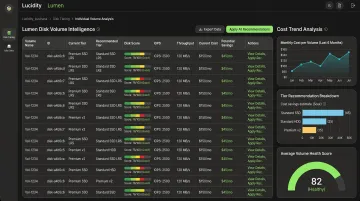
Lucidity also uniquely identifies four types of idle disks — unattached, reserved, unmounted, and zero-I/O — that don't appear in native cloud dashboards. These idle disks represent a significant source of block storage waste that automated tiering leaves entirely unaddressed.
Frequently Asked Questions
What is automated storage tiering?
Automated storage tiering dynamically moves data between faster and slower storage tiers based on access frequency and predefined policies. Hot data stays on high-performance media; cold data migrates to cost-effective storage as access patterns shift — no manual intervention required.
What is the main purpose of the auto tiering feature?
The primary purpose is optimizing the performance-per-dollar balance of storage infrastructure. Expensive, high-speed storage gets reserved for actively accessed data, while infrequently accessed data shifts to cheaper tiers automatically, reducing total storage spend without compromising application performance.
What is Tier 1 and Tier 2 storage?
Tier 1 is high-performance storage (enterprise SSDs, high-IOPS cloud volumes) used for latency-sensitive applications. Tier 2 covers more cost-effective options like HDDs or standard cloud volumes, suited for warm data such as backups or periodic analytics.
What is the difference between automated tiering and caching?
Tiering moves the original data to a different storage medium based on usage patterns — it exists in one location at a time. Caching creates a temporary high-speed copy of frequently accessed data without relocating the original. When demand drops, the cache clears, but the data never physically moved.
How does automated disk tiering work in cloud environments?
Object storage tiering is well-supported across AWS (S3 Intelligent-Tiering), Azure (Blob lifecycle policies), and GCP (Cloud Storage Autoclass). Block storage tiering is more limited: most providers require explicit volume modification rather than automatic data movement, so complementary optimization tools are often needed for full cloud storage efficiency.
What are the limitations of automated disk tiering?
Automated tiering struggles with bursty or irregular access patterns and can introduce performance overhead during data migration. It also doesn't address over-provisioning, idle disks, or volume right-sizing — the issues responsible for the majority of cloud storage waste.