Introduction: Why Moving Azure Managed Disks Is Harder Than It Looks
Azure Managed Disks are block storage volumes that back your Azure VMs. Moving them sounds straightforward. At scale, it rarely is.
Native Azure tools handle a narrow slice of migration scenarios. The gaps add up quickly:
- Cross-tenant transfers: Microsoft explicitly requires cross-subscription moves to stay within the same Microsoft Entra tenant — cross-tenant transfers aren't supported natively
- Unattached disks: Azure Resource Mover doesn't support standalone unattached disk migration
- VHD workarounds: Manual export/import is slow for large disks and capped by a 60-day SAS token expiry window
That's where third-party tools fill the gap. This guide evaluates Veeam, Zerto, Commvault, and Carbonite Migrate — what each does well, where each falls short, and how to choose between them based on your actual migration scenario.
Key Takeaways
- Native Azure tools can't handle cross-tenant moves and struggle with standalone unattached disks at scale
- Use Veeam for full VM workload migrations across regions or subscriptions
- Choose Zerto when near-zero downtime is non-negotiable
- Commvault works best for enterprises needing cross-subscription governance
- Carbonite Migrate handles straightforward lift-and-shift workloads
- No third-party tool has publicly verified native cross-tenant migration without a VHD export step — confirm with each vendor before committing
- Auditing your disk estate before migration prevents you from copying idle and orphaned disks into your new environment and recreating the same waste
Why Organizations Need to Move Azure Managed Disks
The Four Scenarios That Drive Disk Moves
| Scenario | Business Driver | Core Technical Challenge |
|---|---|---|
| Cross-region | Disaster recovery, latency reduction | Disks must reside in the same region as their VM — every move requires detach, copy, and recreate |
| Cross-subscription | Billing restructuring, org changes | Native moves require same Entra tenant; cross-tenant blocked |
| Cross-resource group | Environment reorganization | Generally supported natively, lowest friction |
| Cross-tenant | M&A, vendor transitions | No native support; requires VHD export workaround |
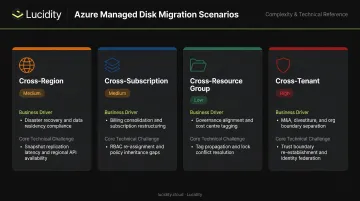
The cross-region constraint is worth understanding clearly. Microsoft states that all managed disks must be in the same region as the VM they attach to. An ARM resource move doesn't change physical region — it only changes the resource's logical home. That makes every cross-region migration a disk recreation exercise, not a relocation.
The Orphaned Disk Problem
Migration complexity isn't the only concern — what you're moving matters just as much as how you move it. When a VM is deleted, its managed disks are not automatically deleted; they persist and keep billing. The FinOps Foundation explicitly classifies unattached Azure disks as storage waste. Across 600+ assessments analyzing over 100 PB of storage, Lucidity found that the average enterprise runs at just 30% disk utilization. Migration sprawl can double down on existing waste if you move before auditing.
Where Native Azure Methods Fall Short
What Each Native Method Can and Cannot Do
Azure Resource Mover handles VM region moves and automatically includes attached disks. The catch: when moving a VM, associated disks should not be selected separately — doing so can cause failures. Standalone unattached managed disk migration via Resource Mover isn't supported as a standalone operation.
ARM cross-subscription moves support Microsoft.Compute/disks as a moveable resource type, but only when source and destination subscriptions belong to the same Microsoft Entra tenant. Cross-tenant moves are blocked at the platform level.
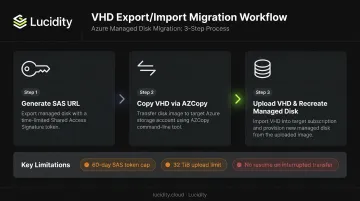
VHD export/import is the documented manual workaround:
- Generate a SAS URL for the managed disk
- Use AZCopy to copy the underlying VHD to a storage account in the target region
- Upload the VHD and recreate the managed disk
Key limitations to know before starting:
- SAS tokens are capped at 60 days (as of February 2025) — large disk transfers risk expiry mid-copy
- Direct upload supports VHDs up to 32 TiB; Ultra Disk and Premium SSD v2 require separate handling
- For large disks, this process can take hours with no resume capability if the SAS expires
AZCopy cross-tenant is the closest native option for tenant-to-tenant transfers. Microsoft Entra ID authorization requires both accounts to share the same tenant. SAS token-based transfers can bridge tenants, but the full export-to-blob, import, and recreate workflow is too brittle for production use.
Top Third-Party Tools to Move Azure Managed Disks
Third-party tools earn their place by absorbing the orchestration complexity that native tools leave to you. When you're moving dozens of disks rather than one, built-in retry logic, bulk operations, consistency guarantees, and rollback capability become non-negotiable. Each tool below handles those concerns differently — here's where each one fits.
Veeam Backup & Replication
Veeam approaches disk migration at the VM level. It captures entire workloads — OS disk, data disks, configuration — and restores them into a target Azure environment, with users specifying the target subscription and region during restore.
What's verified:
- Azure VM restore workflows with cross-region and cross-subscription targeting
- RPO up to 60 snapshots per hour for Azure workloads
- Veeam Backup & Replication v13.0.2.29 (latest as of research date)
What requires vendor confirmation:
- Standalone unattached disk migration outside a VM/backup context is not explicitly documented
- Cross-tenant restore capability — a Veeam community forum thread tracks this as an open feature request
Consider this if: Your team already runs Veeam for backup and wants a single platform for both data protection and VM/disk mobility — particularly when OS and data disk consistency must be maintained together.
Zerto (an HPE Company)
Zerto's distinguishing feature is continuous journal-based replication rather than periodic snapshots. Disk writes replicate continuously to the target site, keeping your recovery point current rather than hours behind.
What's verified:
- Azure-to-Azure and region-to-region replication confirmed
- Recovery disk types include Managed Premium SSD, Standard SSD, and Standard HDD
- Expected RPO for multi-volume consistency: approximately one hour based on Microsoft support limits
- Journal history configurable from 1–71 hours or 1–30 days
What requires vendor confirmation:
- Cross-subscription Azure managed disk migration not explicitly documented in reviewed materials
- Cross-tenant transfers unverified
Works best when: Downtime during migration isn't acceptable, or you need ongoing disaster recovery replication rather than a one-time move.
Commvault
Commvault has the strongest documented claim among the four tools for cross-subscription and cross-region Azure migration. Their official documentation explicitly states replication can target the same or different Azure subscription and the same or different region.
What's verified:
- Cross-subscription and cross-region Azure replication documented
- Managed disks up to 8 TB supported for backup and restore
- Audit Trail tracks all operations with full audit reporting
- Azure Resource Manager VMs with managed and unmanaged disks supported
Known limitation: Restores of encrypted VMs to a different subscription are not supported — this is an Azure platform constraint, not a Commvault gap.
What requires vendor confirmation:
- Cross-tenant managed disk migration
- Standalone unattached disk migration outside VM context
Ideal for: Large enterprises that need centralized governance, compliance audit trails, and policy-based migration across hybrid environments. Strongest choice for organizations already running Commvault for data protection.
Carbonite Migrate (OpenText)
Carbonite Migrate (now under OpenText) uses the Double-Take continuous replication engine for byte-level synchronization. Microsoft's own documentation references this engine for moving system disks to Azure VM disks, with synchronization running until cutover.
What's verified:
- Azure Ultra Disk managed disk support confirmed
- OS/system disk migration to Azure documented
- Byte-level, live replication with "near-zero downtime until cutover"
- No numeric RPO/RTO published in official materials
What requires vendor confirmation:
- Azure-to-Azure cross-region migration
- Cross-tenant transfers
Consider this for: Lift-and-shift migrations from on-premises to Azure, or any scenario where application-level consistency beyond disk state is required.
How to Choose the Right Tool for Your Disk Migration
Decision Framework
Evaluate these four variables before selecting a tool:
- Migration scenario — cross-region, cross-subscription, or cross-tenant?
- Downtime tolerance — zero-downtime requirement or acceptable maintenance window?
- Migration scope — single disk, one VM, or bulk migration of dozens of VMs?
- Existing licenses — do you already run Veeam, Commvault, or Zerto for backup/DR?
Snapshot-Based vs. Continuous Replication
The core trade-off is cost vs. RPO:
- Snapshot-based tools (Veeam, native Azure): simpler, lower cost, suitable for planned maintenance windows. RPO is limited by snapshot frequency.
- Continuous replication tools (Zerto, Carbonite Migrate): higher licensing cost, but near-real-time RPO and minimal cutover windows. Right choice when you can't afford hours of potential data loss.
Cross-Tenant Migrations: Confirm Directly with Vendors
No official documentation for any of the four tools explicitly confirms native cross-tenant managed disk migration without a VHD export step. Before building a migration plan, verify cross-tenant support directly with each vendor — don't assume it's covered.
Tool Comparison Summary
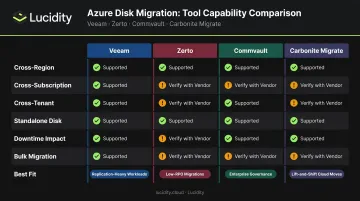
| Veeam | Zerto | Commvault | Carbonite Migrate | |
|---|---|---|---|---|
| Cross-region | ✅ Verified | ✅ Verified | ✅ Verified | ⚠️ Verify with vendor |
| Cross-subscription | ⚠️ Verify | ⚠️ Verify | ✅ Verified | ⚠️ Verify |
| Cross-tenant | ⚠️ Verify | ⚠️ Verify | ⚠️ Verify | ⚠️ Verify |
| Standalone disk migration | ⚠️ Verify | ⚠️ Verify | Managed disks to 8TB | ⚠️ Verify |
| Downtime impact | Maintenance window | Near-zero | Maintenance window | Near-zero |
| Bulk migration | ✅ VM-level | ✅ Continuous | ✅ Enterprise-scale | ✅ VM-level |
| Best fit | Backup-first teams | Near-zero RPO/RTO | Enterprise governance | Lift-and-shift |
Cost Inputs to Factor In
Tool selection isn't just a feature decision — it's a cost decision. Third-party licensing stacks on top of Azure inter-region egress charges, which vary by geography:
- North America or Europe intra-continental: $0.02/GB
- Asia, Oceania, Middle East, or Africa intra-continental: $0.08/GB
- South America intra-continental: $0.16/GB
- Intercontinental from North America or Europe: $0.05/GB
Moving a 10 TB disk between US regions runs roughly $200 in egress alone — before any tooling cost.
All four vendors use quote-based licensing with no public pricing. Budget accordingly and request vendor quotes early in planning.
Before You Move: Pre-Migration Checklist for Azure Managed Disks
Migrating without auditing first is one of the most common ways teams recreate their waste in a new region. The solution is straightforward: audit first, move only what needs to move.
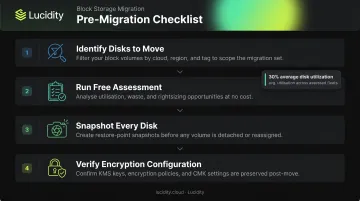
Pre-Migration Steps
Identify which disks actually need moving. Not every disk in your subscription warrants migration. Lucidity's Lumen identifies four categories of idle disks — unattached, reserved, unmounted, and zero-I/O — that together can represent up to 70% of unused block storage spend. These are the disks that should be deleted, not migrated.
Run a free assessment before you start. Lucidity's Assessment tool is agentless, takes roughly five minutes to set up, and surfaces disk utilization metrics, idle disk counts, and potential savings across your Azure environment. Across 600+ assessments, the average enterprise discovers only 30% disk utilization — meaning most provisioned capacity is a candidate for rightsizing or deletion before any migration begins.
Snapshot every disk before initiating migration. Snapshots are separate resources from managed disks and won't follow the disk automatically — create them deliberately as rollback points.
Verify encryption configuration. Confirm whether disks use Platform-Managed Keys (PMK) or Customer-Managed Keys (CMK). Note that Commvault documents that restoring CMK-encrypted VMs to a different subscription is not supported due to an Azure platform limitation, so check each tool's behavior for your encryption configuration before proceeding.
Post-Migration Validation
Once the migration completes, run through these checks before touching the source disks:
- Attach the migrated disk to a test VM and verify data integrity
- Confirm the performance tier (Standard HDD, Standard SSD, Premium SSD) matches workload requirements — Lumen's tiering recommendations can flag Premium SSD disks that could be downgraded post-migration
- Verify application connectivity and I/O performance under load
- Only then delete or deallocate the source disk
Frequently Asked Questions
Can you move an Azure managed disk to a different region?
Azure doesn't support direct region-to-region disk moves. The process requires exporting the disk as a VHD, copying it to a storage account in the target region, and recreating the managed disk — or using a third-party tool that automates this pipeline. The SAS token used during export is valid for a maximum of 60 days.
Can Azure managed disks be moved between tenants?
Native Azure tools block cross-tenant moves; source and destination subscriptions must share the same Microsoft Entra tenant. The standard workaround exports a disk snapshot to a blob, transfers it via AZCopy with SAS tokens, and rebuilds the managed disk in the target tenant. No third-party tool reviewed here has publicly confirmed native cross-tenant support without this intermediate VHD step.
What is the difference between using AZCopy and a third-party tool for disk migration?
AZCopy transfers blob data quickly but requires the disk to be exported as a VHD first, then manually recreated afterward. Third-party tools like Veeam or Zerto orchestrate the full pipeline — export, transfer, recreate, validation — with consistency guarantees, centralized logging, and rollback options that AZCopy alone doesn't provide.
Do third-party tools support moving encrypted Azure managed disks?
Support for CMK-encrypted disks varies by tool. Commvault explicitly documents that encrypted VM restores to a different subscription are unsupported due to an Azure limitation. Before migrating, confirm with your vendor whether CMK-encrypted disks are supported and whether Key Vault permissions need to be pre-configured in the target environment.
Can you move Azure managed disks without downtime?
Near-zero downtime is achievable with continuous replication tools like Zerto or Carbonite Migrate, which sync disk state in near-real-time and keep the cutover window minimal. Snapshot-based approaches, including native Azure methods and Veeam, require a maintenance window since they capture a point-in-time state rather than tracking live writes.
What happens to disk snapshots when a managed disk is moved?
Snapshots are independent resources and do not automatically follow a managed disk to a new region or subscription. They must be independently copied or recreated in the target environment — factor this into your migration plan if snapshots serve as rollback points or part of your recovery strategy.