Introduction
Azure promises elastic cloud resources—provision what you need, scale on demand, pay only for what you use. In practice, SRE teams rarely experience that clean elasticity. Compute scales reasonably well. Storage doesn't.
Teams end up in one of two failure modes: over-provision defensively and watch budget drain away, or under-provision and absorb the SLA breach when demand spikes. Both outcomes trace back to the same root cause — capacity decisions made without a disciplined engineering process.
According to Flexera's 2026 State of the Cloud report, an estimated 29% of IaaS/PaaS cloud spend is wasted, and managing cloud costs is a top challenge for 85% of organizations. That's not rounding error — it's a structural problem built into how most teams provision resources.
This guide covers:
- What capacity management actually means in the SRE context
- How it applies specifically to Azure environments
- The provisioning practices that close the gap between theoretical elasticity and operational reality
Key Takeaways
- Capacity management is an SRE engineering responsibility, not an ops or finance task
- The two failure modes—overprovisioning and underprovisioning—both damage reliability and budget
- Azure Managed Disks cannot be shrunk post-provisioning without disruption, creating persistent storage waste
- SLO-anchored capacity plans, autoscaling policies, and IaC provisioning form the core operational toolkit
- Lifecycle hygiene (idle disk cleanup, right-sizing reviews) recovers wasted spend that monitoring alone misses
What Is Capacity Management in SRE?
The Google SRE Book frames it precisely: capacity management is "ensuring that there is sufficient capacity and redundancy to serve projected future demand with the required availability." It covers CPU, memory, storage, and network—and it's inseparable from provisioning.
Two Ways Capacity Planning Fails
Underprovisioning creates immediate, visible pain:
- Latency spikes under load
- SLO violations and error budget erosion
- Unplanned downtime when disks fill or CPU saturates
Overprovisioning is slower and harder to see:
- Idle resources generate charges with no active workload
- Teams lose visibility into actual utilization baselines
- Budget waste compounds as environments grow
According to Flexera's State of the Cloud report, 29% of cloud spend is wasted—and most of it traces back to overprovisioning. Teams size for worst-case scenarios and rarely revisit those decisions once demand stabilizes.
The SLO Connection
Capacity decisions directly control whether a service can absorb load while staying within its error budget. A service targeting 99.9% availability hits trouble fast when storage fills without warning or compute saturates during a campaign spike—that budget erodes immediately, limiting the team's ability to ship features without burning reliability headroom.
Capacity management belongs to SRE, not finance or ops. As the Google SRE Book states: "Because capacity is critical to availability, the SRE team must be in charge of capacity planning, which means they also must be in charge of provisioning."
Organic vs. Inorganic Demand
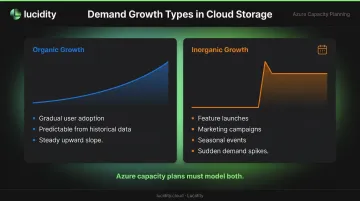
Google SRE distinguishes two demand types every capacity model must handle:
- Organic growth — gradual user adoption, predictable with historical trend data
- Inorganic growth — feature launches, marketing campaigns, seasonal events, business-driven spikes
Both require planning. An e-commerce team preparing Azure capacity for a peak season event must model normal growth and the step-change that arrives on day one of a promotion. Missing inorganic demand is how teams get caught under-provisioned at exactly the worst moment.
The Role of SRE in Azure
Microsoft defines SRE as an engineering discipline focused on helping organizations achieve the right level of reliability in a sustainable way. In Azure environments, that translates to a defined operational scope.
What Azure SREs Actually Own
SRE responsibilities in Azure span the full reliability surface:
- Monitoring and alerting — Azure Monitor dashboards, alert rules, and escalation paths
- Autoscaling configuration — scale-out/in policies for VMs, VMSS, and AKS clusters
- Storage provisioning — Managed Disk tier selection, sizing, and lifecycle management
- Change management — runbooks, staged rollouts, rollback procedures
- Capacity planning — demand forecasting, load testing, headroom calculation
- SLO compliance — ensuring services meet availability and latency targets across regions
Each of these areas maps directly to a boundary defined by Microsoft's shared responsibility model for reliability.
The Shared Responsibility Boundary
Microsoft owns the reliability of the cloud platform itself. SRE teams own workload architecture, resiliency design, service-tier selection, and every configuration choice made on top of that platform.
Capacity planning sits firmly on the SRE side of that line. When a Managed Disk fills and causes downtime, the platform performed exactly as designed—the failure belongs to the provisioning decision, not the infrastructure.
Key Elements of Capacity Planning for Azure SRE Teams
Monitoring and Observability
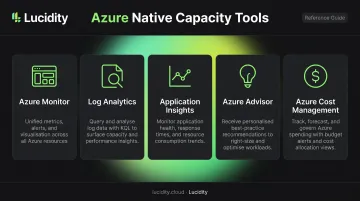
Azure Monitor, Log Analytics, and Application Insights form the observability backbone. VM platform metrics—Percentage CPU, Available Memory Bytes, Data Disk Read/Write Operations/Sec, Network In/Out—provide the raw inputs for capacity baselines.
SREs should establish baseline utilization ranges for each resource type and configure alerts at thresholds below saturation. Catching a disk at 80% capacity is actionable. Catching it at 98% is a fire drill.
Load Testing and Threshold Validation
Baselines from production tell you where you are. Azure Load Testing—Microsoft's fully managed load testing service—tells you where your ceiling is before a real traffic event finds it for you.
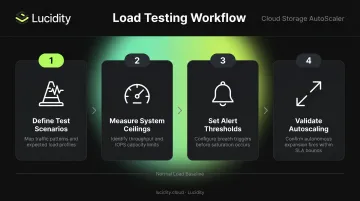
Load testing workflow for capacity planning:
- Define test scenarios — simulate peak traffic based on organic and inorganic demand models
- Measure system ceilings — identify the CPU, memory, and disk IOPS levels where performance degrades
- Set alert thresholds — place them 15–20% below observed saturation points
- Validate autoscaling — confirm scale-out triggers fire before thresholds are breached
Tools like k6 and JMeter complement Azure Load Testing for teams that want more scripting control or CI integration.
SLO-Anchored Capacity Headroom
Capacity plans must be tied to SLOs. A service targeting 99.9% availability needs headroom to absorb peak load without degrading. Google SRE guidance makes this explicit: fixed percentage buffers, such as always provisioning 20% extra, are not universally correct. Target utilization must be set per resource and per service, based on where that specific system begins to degrade.
The practical implication: run load tests to find the degradation point for each resource type, then provision headroom to keep peak utilization comfortably below that point.
Cost vs. Capacity Tradeoffs
Azure resource tiers carry real cost differentials. Getting this wrong in either direction—under-spec for performance or over-spec for cost—is a capacity failure. Use Azure Cost Management to model provisioning tradeoffs before committing. Key decisions include:
- Disk tier selection — Premium SSD adds cost that only pays off for workloads requiring sub-millisecond latency; Standard SSD handles most general-purpose workloads adequately
- VM SKU alignment — compute-optimized vs. memory-optimized SKUs have meaningful price gaps; match SKU class to the actual resource bottleneck
- Scale unit cost modeling — tier decisions that seem small per instance compound significantly across fleets
Azure Provisioning Best Practices
Provision as Code, Not as a One-Time Action
All Azure resource provisioning should go through Infrastructure as Code—Terraform with the AzureRM provider, or Bicep for Azure-native teams. The operational case is straightforward:
- Reproducibility — environments can be rebuilt identically
- Change review — provisioning changes go through pull requests like any other code change
- Version control — rollback to a known-good state when provisioning errors occur
- Audit trail — every capacity change is documented in source history
GitHub Actions or Azure DevOps pipelines should automate IaC deployments, eliminating manual console-click provisioning that bypasses change control entirely.
Autoscaling for Compute and Containers
Azure VMSS Autoscale and AKS Horizontal Pod Autoscaler + Cluster Autoscaler handle compute elasticity well—but only when configured proactively.
Configure scale-out rules based on SLI thresholds:
- CPU > 70% sustained for 5 minutes → trigger scale-out
- Memory pressure above defined threshold → scale-out or alert
- Pod pending state in AKS → Cluster Autoscaler adds nodes
The goal is to scale before users feel the constraint, not after latency has already spiked.
The Storage Provisioning Trap
This is the most underappreciated provisioning problem in Azure environments. Unlike compute, Azure Managed Disks cannot be shrunk after provisioning without disruption. Microsoft's own documentation confirms this: the workaround requires creating a smaller disk and copying data, which is a migration, not a resize.
The operational result is predictable. Teams provision disks generously "just in case," hit the one-way door, and the over-provisioned capacity becomes permanent unless someone runs a disruptive migration.
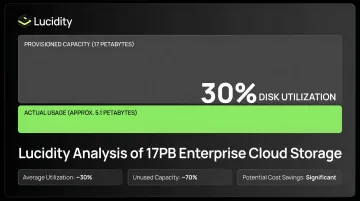
Across Lucidity's analysis of over 17 petabytes of enterprise cloud storage, the average organization runs at roughly 30% disk utilization, meaning most provisioned capacity sits idle. IaC won't recover that waste once the disk is provisioned.
Lucidity's AutoScaler addresses this directly: it autonomously expands Azure Managed Disks in real time as data grows and shrinks them to reclaim unused capacity, with zero downtime and no code changes required. For SRE teams carrying persistent storage overhang, that's autonomous right-sizing without the migration work.
Lifecycle Hygiene and Provisioning Cadence
Resources don't just over-provision at creation; they accumulate waste over time. Idle Azure resources (unattached disks, stopped VMs, orphaned snapshots) continue billing without contributing to any workload.
Establish a monthly provisioning review to:
- Identify and decommission unattached Managed Disks
- Stop or resize underutilized VMs flagged by Azure Advisor
- Delete orphaned snapshots with no corresponding active workload
- Review reserved capacity commitments against actual usage
Lucidity's Lumen product goes further than Azure Advisor's native recommendations. It detects four categories of idle disks (unattached, reserved, unmounted, and zero-I/O) that standard dashboards often miss, with full context on disk age, usage history, and cost impact. One-click cleanup from the dashboard compresses the review-to-action cycle for SRE teams.
Change Management for Provisioning
Lifecycle hygiene involves making changes to live systems, and that carries real risk. Google SRE data is consistent: roughly 70% of outages trace back to changes in production. Provisioning changes (disk tier migrations, node pool resizes, storage account reconfiguration) are no exception, and they deserve the same rollout discipline as application deployments.
Apply staged rollout discipline to major capacity changes:
- Test in staging, validate metrics under load
- Deploy to a subset of production
- Monitor for 24–48 hours before full rollout
- Document a rollback procedure in a runbook before step one
Azure Capacity Planning Tools and Automation
Azure-Native Tooling
| Tool | Capacity Use Case |
|---|---|
| Azure Monitor | Metrics, alerts, dashboards for CPU, memory, disk IOPS, network |
| Log Analytics | KQL-based queries against historical utilization data |
| Application Insights | Application-level performance and error tracking |
| Azure Advisor | Right-sizing recommendations for VMs and Managed Disks |
| Azure Cost Management | Spend tracking, cost forecasting, budget alerts |
Used together, these tools give SREs a closed loop: raw utilization data flows into actionable right-sizing recommendations, which then tie directly to spend forecasts — so provisioning decisions are grounded in both performance data and budget reality.
Forecasting and Load Validation
- Azure Load Testing — fully managed high-scale load simulation, integrates with CI/CD pipelines
- Prometheus + Azure Managed Grafana — time-series metrics and dashboards for custom capacity models
- Azure Monitor dynamic thresholds — ML-based anomaly detection that learns hourly and daily seasonal patterns, reducing alert noise while surfacing genuine capacity trends
Once you've validated load assumptions, the next step is encoding capacity decisions into repeatable, reviewable deployments.
IaC and Deployment Automation
- Terraform (AzureRM provider) — multi-cloud IaC with mature Azure resource coverage
- Bicep — Azure-native declarative language, simpler syntax than ARM JSON
- GitHub Actions / Azure DevOps — pipeline automation for IaC deployments, enforcing change control on all provisioning operations
Frequently Asked Questions
What is capacity management in SRE?
Capacity management is the SRE practice of predicting, allocating, and adjusting computing resources—CPU, memory, storage, network—to meet current and future demand while balancing availability against cost. It's an engineering discipline with measurable outcomes, not a finance exercise.
What is the role of SRE in Azure?
Azure SREs own the reliability and scalability of cloud-hosted services—including monitoring configuration, autoscaling policies, provisioning decisions, and SLO compliance across compute, storage, and networking. Microsoft manages the underlying platform; SRE teams own everything deployed on top of it.
How does capacity planning connect to SLOs and error budgets?
Insufficient capacity under peak demand raises latency and error rates, eroding the error budget. SREs size capacity to keep services within SLO bounds even at projected peak load, preserving budget headroom for feature releases rather than burning it on avoidable infrastructure failures.
What is the difference between organic and inorganic demand growth?
Organic growth is gradual usage increase from natural product adoption—predictable from historical trends. Inorganic growth is sudden demand from events like feature launches or marketing campaigns. Azure capacity plans must model both; missing an inorganic event typically means being under-provisioned at the worst possible moment.
Why is storage provisioning a unique challenge for Azure SRE teams?
Azure Managed Disks cannot be downsized post-provisioning without a disruptive data migration, so teams defensively over-provision disk capacity and rarely reclaim it. This creates persistent storage waste that native tooling doesn't resolve. Addressing it requires either manual migration work or an autonomous right-sizing layer like Lucidity AutoScaler, which handles expansion and shrinking without downtime.