Key Takeaways
- Azure AI is now unified under Microsoft Foundry (ai.azure.com), covering everything from pre-built APIs to full ML platforms
- Core capability categories: Vision, Language, Speech, Generative AI, and Machine Learning
- Azure OpenAI Service gives enterprises access to GPT-4, DALL·E, and Whisper within Azure's security perimeter
- AI and ML workloads drive significant Azure Managed Disk costs through training data, model checkpoints, and inference logs
- Free tiers exist for most services; use the Azure Pricing Calculator before committing to production
Enterprise teams are investing heavily in AI, but Microsoft's Azure AI ecosystem is genuinely sprawling. From generative AI and computer vision to speech processing and full MLOps platforms, choosing where to start isn't obvious — and picking the wrong entry point wastes months.
This guide cuts through that complexity. You'll get a plain-language breakdown of how Azure AI is structured, what the most important services actually do, which industries are using them effectively, and how to manage the infrastructure costs that quietly compound as AI workloads scale.
What Is Azure AI? The Platform Explained
Azure AI is Microsoft's cloud-based suite of AI services, tools, and infrastructure — designed so developers and organizations can build, deploy, and manage intelligent applications without needing deep AI research expertise.
How the Platform Is Organized
Microsoft has consolidated its AI capabilities under Microsoft Foundry, the current unified platform at ai.azure.com for discovering, testing, and deploying AI models and services. The Azure AI Foundry SDK was announced in November 2024, and Foundry Tools is now the name for the collection previously known as Azure AI Services (and before that, Azure Cognitive Services).
The platform spans three layers of technical maturity:
- Pre-built APIs — ready to call with minimal code for tasks like OCR, translation, or sentiment analysis
- Customizable models — fine-tunable for specific business needs without ML expertise
- Full ML platforms — for teams building models from scratch using their own data
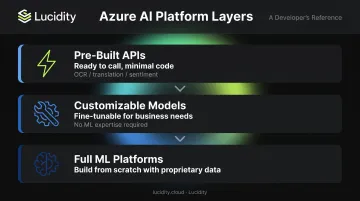
That layered structure also reflects how Azure AI approaches enterprise adoption — each tier is backed by the same compliance and security foundation. Key controls include:
- FedRAMP audit scope, HIPAA BAA, and CSA STAR certification (service and region scope should be verified on Microsoft's compliance pages)
- Microsoft Entra ID for identity and access management
- Azure Virtual Networks for private connectivity
- Regional data residency options
Access methods span the full technical spectrum:
- REST APIs and client library SDKs (Python, C#, TypeScript, Java) for developers and data scientists
- Browser-based no-code interfaces for non-technical users who need to build or test without writing code
Core Azure AI Capability Categories
Azure AI's offerings span five major categories — Vision, Language, Speech, Generative AI, and Machine Learning. Knowing which category covers your use case is the fastest way to narrow down which services to evaluate.
Vision
Azure AI Vision analyzes images and video to identify objects, extract printed and handwritten text via OCR, detect faces, and perform spatial analysis on video streams. For teams that need domain-specific classifiers, Azure AI Custom Vision lets users build and deploy image identification models through a web portal — no ML expertise required.
Language and Translation
Azure AI Language provides NLP features including sentiment analysis, key phrase extraction, named entity recognition, and conversational language understanding. Azure AI Translator extends this further, supporting text and document translation across more than 100 languages — making the combination well-suited for multilingual enterprise applications and global customer support workflows.
Speech Processing
Azure AI Speech handles bidirectional conversion between speech and text, real-time speech translation, speaker recognition, and custom voice model creation. It powers Microsoft Teams' live captions and real-time interpreter features, which gives enterprise teams a concrete reference point for what production-scale multilingual deployment looks like in practice.
Generative AI
Azure OpenAI Service provides access to OpenAI's GPT-4, DALL·E, Whisper, and Codex-family models through Azure's secure infrastructure. This is distinct from calling the OpenAI API directly — Azure's version adds Microsoft Entra ID authentication, private networking, content filtering, and enterprise compliance controls.
Any platform using those models at scale also needs a moderation layer. Azure AI Content Safety fills that role, using ML to detect harmful or inappropriate content across text, images, and video — particularly important for applications handling user-generated content.
Azure Machine Learning
Azure Machine Learning is the full-lifecycle MLOps platform for custom model development. It includes:
- Drag-and-drop model training via Designer, requiring no code
- Automated algorithm selection via AutoML for teams without dedicated ML staff
- Full code-first notebooks and SDKs for experienced data scientists
- Native CI/CD integration through GitHub Actions and Azure DevOps for production pipelines
Key Azure AI Services to Know
These are the services enterprise teams most commonly deploy. All are accessible through Microsoft Foundry and supported by Microsoft's global data center network.
Azure OpenAI Service
Azure OpenAI gives enterprises access to leading models — GPT-4, DALL·E, Whisper, and Codex-family variants — within Azure's security perimeter. Authentication supports both API keys and Microsoft Entra ID, with private networking and content filtering built in.
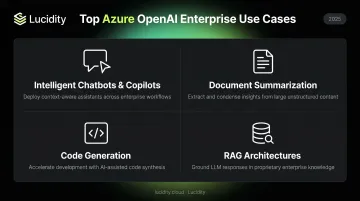
Common enterprise use cases:
- Intelligent chatbots and copilots for internal and customer-facing applications
- Document summarization across contracts, reports, and clinical notes
- Code generation to accelerate software development
- Retrieval Augmented Generation (RAG) architectures that combine Azure OpenAI with Azure AI Search to answer questions grounded in an organization's proprietary data
Azure AI Document Intelligence
Formerly Form Recognizer, Azure AI Document Intelligence uses ML and OCR to extract structured data from invoices, contracts, forms, and receipts. Pre-built models handle common formats; custom model training handles domain-specific documents. Finance, legal, and healthcare teams are the heaviest users.
Azure AI Search
Azure AI Search is a managed search platform that goes beyond keyword matching. It applies NLP, semantic ranking, and custom scoring to surface relevant results — and serves as the recommended vector store and retrieval layer for RAG-based applications on Azure.
Azure AI Content Safety and Bot Service
- Azure AI Content Safety — automated detection of harmful content across text and images for platforms with user-generated content
- Azure Bot Service — a platform for building conversational agents with natural language understanding, deployable across web, Microsoft Teams, and mobile
Azure AI Use Cases Across Industries
Financial Services
Raiffeisen Bank International built its RBI ChatGPT application using Azure OpenAI Service and Azure AI Search within Azure AI Foundry , combining generative AI with enterprise retrieval for internal knowledge management. Beyond chatbots, Azure AI Language and Document Intelligence support contract review, regulatory compliance monitoring, and financial report summarization across large document libraries.
Healthcare
Azure covers several high-value healthcare workflows out of the box:
- Azure AI Vision assists in diagnostic imaging review and radiology triage
- Azure AI Language processes clinical notes and patient records at volume
- Azure AI Speech enables voice-powered documentation, reducing the administrative burden behind clinician burnout
- HIPAA BAA support makes these capabilities viable for covered healthcare workloads without a separate compliance lift
Retail and Manufacturing
Computer vision handles quality control on assembly lines and shelf monitoring without manual inspection. Azure AI Translator powers multilingual storefronts, letting retailers serve customers in their native language without maintaining separate regional builds.
Getting Started with Azure AI Services
Two Entry Points
Pre-built APIs let you integrate services like Azure AI Vision or Speech directly into existing applications via REST APIs and SDKs. No AI expertise required, fast time-to-value, and most services have free tiers available on Azure's free services page.
Custom model development uses Azure Machine Learning for teams that need to train and fine-tune models on proprietary data. The upfront investment is higher, but you get full control over model behavior and performance.
Practical First Steps
- Create an Azure account and navigate to Microsoft Foundry at ai.azure.com
- Explore the model catalog — browse available models and services without commitment
- Prototype on free tiers — test services before committing to production pricing
- Model costs early — use the Azure Pricing Calculator before scaling any workload
Deployment Flexibility
Azure AI services run in three configurations:
- Cloud (default): fully managed and globally available
- On-premises containers: meets data sovereignty and compliance requirements
- Hybrid: supports air-gapped infrastructure or strict regulatory constraints
Many Azure AI services support containerized deployment, though availability varies by service. Check Microsoft's container support documentation to confirm what's available before planning your architecture.
Managing Azure AI Infrastructure Costs
AI workloads have a storage problem that most teams underestimate until it shows up in the bill.
Why AI Workloads Drive Storage Costs
IDC reported in 2025 that AI infrastructure storage spending is driven by the need to manage large datasets required for model training. In practice, this translates to three cost drivers that compound quickly:
- Training datasets grow with every model iteration and require frequent, fast access
- Model checkpoints accumulate across experiments faster than teams typically track
- Inference logs generate continuously in production and are often retained longer than needed
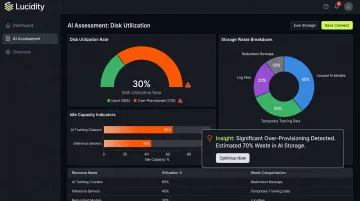
Organizations typically over-provision storage to avoid performance bottlenecks, then don't reclaim capacity when it's no longer needed. Lucidity's Assessment tool has analyzed over 100 petabytes of enterprise storage and found an average disk utilization of just 30% — meaning roughly 70% of provisioned capacity sits unused across enterprise environments. AI workloads amplify this pattern.
Controlling Storage Costs for AI Workloads
Autonomous block storage optimization addresses the over-provisioning problem directly. Lucidity's AutoScaler monitors Azure disk utilization in real time and automatically right-sizes storage — expanding when workloads need capacity, shrinking when they don't — with zero downtime and no infrastructure changes required.
Lumen, Lucidity's storage intelligence product, surfaces idle disks (unattached, reserved, unmounted, and zero-I/O) and provides tiering recommendations, including Azure-specific transitions like Premium SSD to Standard SSD, with one-click execution. These capabilities can reduce cloud block storage costs by up to 70% across Azure, AWS, and Google Cloud.
FinOps Practices to Implement Now
- Tag resources by project and team before AI workloads proliferate
- Use Azure Monitor and Azure Cost Management to track consumption by service — Microsoft Cost Management is specifically designed as a FinOps tool for analyzing and optimizing Microsoft Cloud costs
- Audit idle resources regularly — compute, networking, and storage all accumulate waste as AI adoption scales
- Run storage assessments — Lucidity's free Assessment tool requires no agents, no code changes, and takes under five minutes to connect; it gives teams immediate visibility into disk utilization rates and idle capacity before committing to any optimization tooling
Frequently Asked Questions
What AI models does Azure AI offer?
Azure AI Foundry's model catalog includes OpenAI's GPT-4, DALL·E, Whisper, and Codex-family models via Azure OpenAI Service, alongside Microsoft's own models and a range of open-source models. All are accessible through a unified platform with enterprise security controls.
What is Azure AI Foundry?
Microsoft Foundry (at ai.azure.com) is Microsoft's centralized platform for discovering, testing, and deploying AI models and services. It replaced the older Azure Cognitive Services portal with a unified, project-based environment spanning discovery, experimentation, and production deployment.
What is the difference between Azure OpenAI and OpenAI?
Azure OpenAI delivers the same models (GPT-4, DALL·E, etc.) as OpenAI, but within Microsoft Azure's infrastructure. Enterprise customers get Microsoft Entra ID authentication, private networking, Azure compliance certifications, and built-in content filtering (none of which are available when calling the OpenAI API directly).
How much do Azure AI Services cost?
Azure AI Services use consumption-based pricing, with free tiers available for most services. Actual costs vary significantly by service, usage volume, and region. Use the Azure Pricing Calculator for realistic estimates before production deployment.
Is Azure AI suitable for enterprise use?
Yes. Azure AI supports FedRAMP audit scope, HIPAA BAA (for in-scope services), and CSA STAR certification. It integrates with Microsoft Entra ID, supports Azure Virtual Networks for private connectivity, and offers regional data residency options — suitable for healthcare, financial services, and government workloads.
Can Azure AI services be deployed on-premises?
Many Azure AI services support containerized deployment for on-premises or air-gapped environments. This lets organizations bring AI capabilities to sensitive data without routing it through the public cloud. Container availability is service-specific — check Microsoft's documentation for each service before planning an on-premises deployment.