Introduction
Migrating from AWS to Azure looks compelling on paper — tighter Microsoft 365 integration, Azure OpenAI access for enterprise AI workloads, and licensing savings through Azure Hybrid Benefit. The business case often holds up. The execution, however, frequently surfaces complexity and costs that weren't in the original estimate.
The hidden costs accumulate fast:
- Data egress fees charged by AWS as workloads transfer out
- Parallel running periods where both environments are billed simultaneously
- Security reconfiguration across IAM policies, firewalls, and compliance controls
- Application refactoring where AWS-native services don't map cleanly to Azure equivalents
And once workloads land on Azure, over-provisioned storage quietly compounds the bill — a pattern that follows organizations from AWS regardless of how carefully the migration was planned.
This guide covers the real cost layers of an AWS-to-Azure migration, the technical and operational challenges most teams underestimate, and what it takes to actually optimize storage spend once workloads are running on Azure.
Key Takeaways
- Migration drivers are strongest around Microsoft ecosystem integration, Azure OpenAI access, and existing Windows Server or SQL Server licenses — not pure cost arbitrage
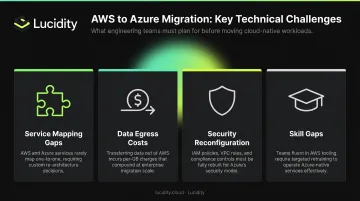
- The biggest technical challenges: service mapping gaps, data egress costs, IAM-to-RBAC reconfiguration, and refactoring applications built on AWS-native services
- Migration costs span four distinct layers: egress fees, parallel running spend, labor, and ongoing Azure run costs — each requires a separate estimate
- Storage over-provisioning is the most overlooked post-migration cost driver — the average enterprise uses only 30% of provisioned block storage
- Lucidity helps Azure teams right-size block storage and cut storage costs by up to 70% — no infrastructure changes required
Why Do Companies Migrate from AWS to Azure?
The decision to move from AWS to Azure is rarely driven by price alone. Most organizations that make this move have a specific strategic catalyst.
Microsoft Ecosystem Alignment
For companies already running Microsoft 365, Teams, Dynamics 365, or Active Directory, Azure offers native integration that AWS simply cannot match. Identity federation through Microsoft Entra ID, unified compliance controls, and seamless connectivity between Azure workloads and Microsoft SaaS products reduce operational friction. For Microsoft-centric organizations, that integration value alone often justifies the migration cost.
Azure OpenAI Access
Microsoft's multibillion-dollar, multiyear partnership with OpenAI means Azure customers get enterprise-grade access to GPT-4 and other foundation models through Azure OpenAI Service. For organizations building generative AI workflows — especially in regulated industries — this matters.
Azure OpenAI enforces strict data controls that matter for regulated industries:
- Customer prompts, completions, and training data are not shared with OpenAI or other customers
- Data is not used to train foundation models without explicit permission
- Standard deployments process data within the customer-specified geography
For industries with data residency requirements — healthcare, financial services, government — these controls directly affect compliance posture.
Licensing Economics
Organizations with existing Windows Server or SQL Server licenses can access Azure Hybrid Benefit, which saves Windows Server customers up to 80% versus standard pay-as-you-go rates, with SQL Server Integration Services savings of up to 55%.
Without these license arrangements, the raw compute cost difference between AWS and Azure is often marginal. In those cases, justify migration on strategic grounds — not primarily financial ones.
Key Challenges of AWS to Azure Migration
Heterogeneous Service Mapping
AWS and Azure offer comparable services, but Microsoft's own documentation acknowledges that services do not always have clear one-to-one correspondence and not every matched service has feature-for-feature parity.
Common mappings include:
- Compute: AWS EC2 → Azure Virtual Machines
- Object storage: AWS S3 → Azure Blob Storage
- Block storage: AWS EBS → Azure Managed Disks
- Relational databases: AWS RDS → Azure SQL Database, Azure Database for MySQL/PostgreSQL
- NoSQL: AWS DynamoDB → Azure Cosmos DB
- Serverless: AWS Lambda → Azure Functions
- Streaming: Amazon Kinesis → Azure Event Hubs / Azure Stream Analytics
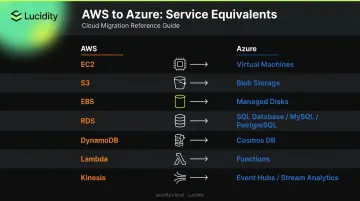
The mappings exist, but configuration logic differs. Dependent systems often require reconfiguration that wasn't scoped in the initial estimate. Run a thorough dependency mapping exercise using Azure Migrate before any execution begins, and explicitly flag workloads that need refactoring rather than a direct lift-and-shift.
Service mapping is one layer of complexity — but moving the actual data introduces a separate cost problem that catches many teams off-guard.
Data Transfer Complexity and Egress Costs
Moving large datasets between AWS and Azure takes time and carries direct costs. AWS charges for outbound data transfer after a 100 GB/month free tier — internet egress runs $0.09/GB for the first 10 TB/month, stepping down to $0.085/GB for the next 40 TB and $0.07/GB beyond that.
For a 50 TB migration, that's roughly $4,000–$4,500 in egress fees alone — before any Azure ingestion or labor costs.
AWS announced in 2024 that it waives data transfer charges when customers move data outside AWS, but this requires proactively contacting AWS Support. Don't assume the waiver is automatic.
Mitigation options:
- Azure Data Box for offline bulk transfers when network transfer is impractical
- Azure ExpressRoute for dedicated private connectivity during migration
- Incremental sync and compression to reduce total transfer volume
Security and Compliance Reconfiguration
AWS IAM and Azure RBAC are fundamentally different identity models. Microsoft's own comparison documentation confirms these are distinct constructs that require deliberate mapping — not a direct translation.
Monitoring tools don't carry over either:
- AWS GuardDuty has no direct Azure equivalent — Microsoft Defender for Cloud and Azure Security Center must be configured from scratch
- CloudTrail logs don't translate to Azure Monitor; audit trails need to be rebuilt
- Compliance policies tied to AWS Config rules require re-implementation in Azure Policy
Conduct a full security audit during the planning phase and involve security teams before workloads move.
Application Refactoring and Downtime Risk
Applications tightly coupled to AWS-native services — Lambda, DynamoDB, Kinesis, SQS — often need significant code changes to run on Azure equivalents. This is the most labor-intensive challenge in any migration, and the effort is almost always underestimated at scoping.
Recommended approach:
- Use Azure Site Recovery for continuous replication and near-zero-downtime cutover
- Run parallel environments during cutover to allow testing before switching live traffic
- Microsoft provides a dedicated migration guide for AWS Lambda to Azure Functions — use it
Skill Gaps
Teams fluent in AWS tooling face a real learning curve with Azure's portal, CLI, resource naming conventions, and governance model. The time spent learning, troubleshooting unfamiliar behavior, and reworking misconfigurations adds up fast — easily 20–40% of total engineering hours on mid-size migrations. Budget for it explicitly, or absorb the overrun later.
Understanding the True Cost of AWS to Azure Migration
Migration costs aren't a single number. They fall into four distinct layers, each with a different timing and visibility profile.
Layer 1: Data Egress Fees
As noted above, AWS charges per-GB for outbound data transfer unless an exit waiver is granted. For multi-terabyte migrations, this is a material line item. Calculate expected egress volume against current AWS pricing before committing to a migration timeline.
Layer 2: Parallel Running Costs
During cutover, both environments run simultaneously — AWS for live traffic, Azure for testing and gradual transition. Depending on workload complexity, this "double-pay" period can last weeks to months. Scope this period explicitly per workload — no reliable published benchmark exists, and a flat-percentage estimate will almost always be wrong.
Layer 3: Storage Over-Provisioning — A Hidden Cost Trap
When organizations replicate their AWS storage configuration into Azure, they carry over the same over-provisioning patterns that existed before. Cloud block storage is routinely allocated far beyond actual usage to avoid performance risk — and nobody shrinks it afterward.
Lucidity's analysis across 600+ enterprise assessments covering 100+ PB of storage consistently finds that the **average enterprise uses only 30% of its provisioned block storage**. That means organizations are paying for roughly 3x the storage they actually need.
This pattern doesn't fix itself during migration. If anything, it worsens — teams provision generously for the new Azure environment "just in case" and never revisit those allocations.
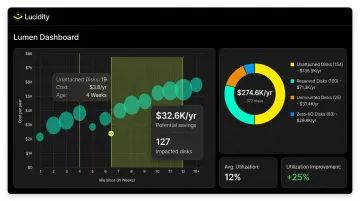
This is a solvable problem — but only with tooling built for it. Lucidity's block storage optimization platform tackles over-provisioning on Azure directly. Its Lumen product surfaces four categories of idle disks — unattached, reserved, unmounted, and zero-I/O — that native Azure dashboards typically miss. AutoScaler then right-sizes volumes continuously, with no infrastructure changes and zero downtime. Across deployments, Lucidity increases average utilization from 30% to 75%, cutting block storage costs by up to 70%.
Layer 4: Licensing and Pricing Model Differences
Azure and AWS have different pricing structures across compute, storage, and databases. A direct lift-and-shift typically lands workloads on Azure pay-as-you-go rates — the most expensive option. Azure Reserved Instances, Savings Plans, and Hybrid Benefit can dramatically reduce those costs, but require deliberate post-migration action.
Microsoft provides a 180-day concurrent license allowance under Azure SQL Hybrid Benefit during migration — useful for overlapping SQL workloads.
Layer 5: Labor and Professional Services
Engineering time for planning, dependency mapping, security reconfiguration, testing, and cutover is the cost most organizations underestimate. For smaller environments, internal teams can manage the migration with tooling support. For complex enterprise estates with many interdependent services, third-party migration partners reduce risk — but add cost. The decision depends on internal Azure expertise and downtime tolerance, not just budget.
Migration Strategies: Choosing the Right Approach
Your choice of migration strategy directly shapes total cost, timeline, and long-term Azure optimization potential. Microsoft's Cloud Adoption Framework defines several approaches — three matter most for AWS-to-Azure transitions:
| Strategy | When to Use | Trade-off |
|---|---|---|
| Rehost (lift-and-shift) | Speed is the priority; workloads aren't tightly coupled to AWS services | Fastest, but misses Azure optimization opportunities |
| Replatform | Moderate changes to adopt managed Azure services without full redesign | Balanced effort vs. benefit |
| Rearchitect / Rebuild | Workloads need Azure-native capabilities (AI, serverless, etc.) | Most time-intensive; highest long-term optimization |
Core Azure Migration Tools
- Azure Migrate — Discovery, assessment, dependency mapping, and migration hub for AWS EC2 to Azure VMs
- Azure Site Recovery — Continuous replication for near-zero-downtime cutover (primarily a DR tool, but usable for migration)
- Azure Database Migration Service — Handles RDS for PostgreSQL, Aurora PostgreSQL, and SQL Server to Azure SQL Database migrations
- Azure Data Box — Offline bulk data transfer when network-based migration is impractical
Start with non-critical, low-dependency workloads. This builds team confidence with Azure tooling and validates the process before you move mission-critical systems.
How to Reduce Cloud Costs After Migrating to Azure
Reserved Instances and Savings Plans
For stable, predictable workloads, commitment-based pricing delivers significant discounts:
- Azure Reserved Instances (1 or 3-year): reduce VM and SQL Database compute costs by up to 72% versus pay-as-you-go
- Azure Savings Plan for Compute: saves up to 65% on select compute services
- Azure database savings plans: saves up to 35% on database services
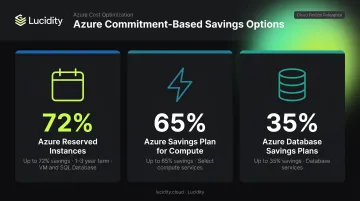
One caution: don't commit to reservations immediately after migration. Run workloads for 30–60 days first to understand actual consumption patterns before locking in 1- or 3-year terms.
Azure Hybrid Benefit and VM Right-Sizing
Azure Hybrid Benefit is one of the most impactful cost levers available, delivering up to 80% savings on Windows Server workloads for organizations with existing licenses. Apply it to every eligible VM immediately after migration.
Pair this with VM right-sizing. Migrated VMs are frequently oversized for Azure. Azure Advisor uses machine-learning algorithms to identify low-utilization resources and recommends downsizing or shutting down underused instances. Run Advisor recommendations within the first 60 days post-migration — savings typically appear within the first billing cycle.
Eliminating Idle Storage and Over-Provisioned Disks
Block storage is the most persistently over-provisioned resource type in Azure estates. Unattached disks, reserved-but-unused volumes, unmounted disks, and zero-I/O volumes all generate direct charges with no operational value.
Microsoft's own documentation covers finding and deleting unattached managed disks as a starting point, but manual cleanup doesn't catch all four idle disk categories or prevent new waste from accumulating.
Lucidity's Lumen surfaces all four idle disk types across Azure environments, including disks that don't appear in native dashboards. AutoScaler continuously right-sizes block storage volumes as usage patterns shift — with zero downtime and no infrastructure changes required.
Continuous Cost Monitoring
Set up Azure Cost Management and Budgets immediately after migration. Key actions:
- Create per-resource spend tracking from day one
- Set anomaly alerts before unexpected bills accumulate
- Generate showback/chargeback reports for internal teams
- Review Azure Advisor recommendations weekly for the first 90 days
Without active monitoring, cloud spend on Azure drifts upward as unused resources accumulate and reserved capacity goes unreviewed.
Frequently Asked Questions
How much does it cost to migrate from AWS to Azure?
Costs vary widely based on data volume, number of workloads, migration strategy, and engineering labor. Scope each layer individually — egress fees, parallel running periods, licensing changes, and post-migration optimization all carry separate cost implications beyond migration tooling alone.
How long does an AWS to Azure migration typically take?
Simple applications with few dependencies can migrate in weeks. Complex enterprise environments with many interdependent services typically take several months. Dependency complexity, data volume, downtime tolerance, and team Azure familiarity all affect your timeline.
What are the biggest technical challenges when migrating from AWS to Azure?
Service mapping gaps (AWS and Azure services lack feature-for-feature parity), data egress costs and latency, IAM-to-RBAC reconfiguration, and the effort required to refactor applications built on AWS-native services like Lambda, DynamoDB, and Kinesis.
What Azure tools are used for migrating from AWS?
The four core Microsoft-provided tools are Azure Migrate (discovery and assessment), Azure Site Recovery (near-zero-downtime replication and cutover), Azure Database Migration Service (database-specific migrations from RDS and SQL Server), and Azure Data Box (offline bulk data transfer).
How can I minimize downtime during an AWS to Azure migration?
Use Azure Site Recovery for continuous replication before cutover, combined with thorough testing in a non-production Azure environment. Switch live traffic only after validating the Azure environment under realistic load conditions.
What is the equivalent of AWS EC2 in Azure?
Azure Virtual Machines are the functional equivalent of AWS EC2 instances. Instance families have approximate equivalents — for example, AWS m5.4xlarge maps roughly to an Azure D16 v3 — but configurations and pricing differ enough that you should run a formal assessment using Azure Migrate rather than relying on direct size mappings.