Managing block storage in the cloud is harder than it looks.
Across AWS, GCP, and Azure, teams routinely overprovision storage to stay safe from outages. In practice, this often results in 2-3x excess capacity - tying up cloud budgets in resources that sit idle most of the time.
Lucidity AutoScaler autonomously right-sizes block storage for your cloud instances in real time. The result: 50-70% storage cost savings, minimal operational overhead, and zero downtime.
From Capacity Management to Performance-Aware AutoScaling
At its core, AutoScaler was built to solve a simple but critical problem:
“Ensure your disks never run out of space, without paying for unnecessary capacity.”
Different applications have different I/O patterns, and running out of disk space in production is not an option. To manage this safely, Lucidity introduced AutoScaling policies that let you define a healthy utilization range for storage - typically 75-80%.
For example, if you have ~80 GB of actual data, AutoScaler adjusts your storage capacity to ~100 GB so that utilization stays within the healthy range.
As your data grows, AutoScaler automatically adds more capacity while honoring the policy - protecting you from sudden spikes without overprovisioning.
Conversely, if your data footprint shrinks, AutoScaler reduces excess capacity to bring utilization back into the healthy range, ensuring you’re not paying for unused storage.
Over time, however, we noticed a recurring pattern in production workloads: “capacity and performance are often tightly coupled.”
Even if you have enough space, your application can still suffer if the underlying disks can’t deliver the required IOPS or throughput. Sub-optimal storage performance directly translates to slower response times and degraded user experience.
How the Cloud Addresses Performance (and Why It’s Not Enough)
Cloud providers offer multiple ways to tune disk performance:
- Different disk tiers with varying performance characteristics
- Performance scaling with disk size (bigger disks = higher baseline performance)
- Explicit provisioning of IOPS and throughput at additional cost
Our customers use a combination of these approaches to best suit their application needs when setting up their infrastructure.
While these primitives are powerful, they’re still largely manual and static. For example, when you scale up capacity by attaching new disks, you also need to remember to configure their performance settings to match the existing ones - otherwise, you risk introducing performance bottlenecks.
This also surfaced a gap in our original model:
“AutoScaling policies were optimized for capacity, not performance-aware capacity.”
So we rethought the policy design.
Introducing Performance-Aware AutoScaling Policies
AutoScaling policies now have two dimensions:
- Capacity: to maintain healthy disk utilization
- Performance: to guarantee application-level performance
With the new performance controls, you can:
- Define a minimum disk size per instance to meet baseline performance needs
- Specify IOPS and Throughput targets, and have AutoScaler ensure all attached disks meet these requirements
- Automatically balance performance requirements with cost-efficient capacity scaling
AutoScaler continuously reconciles these constraints - staying as close as possible to your optimal utilization range while honoring performance guarantees.
Here’s a Policy screenshot from AutoScaler policy configuration:
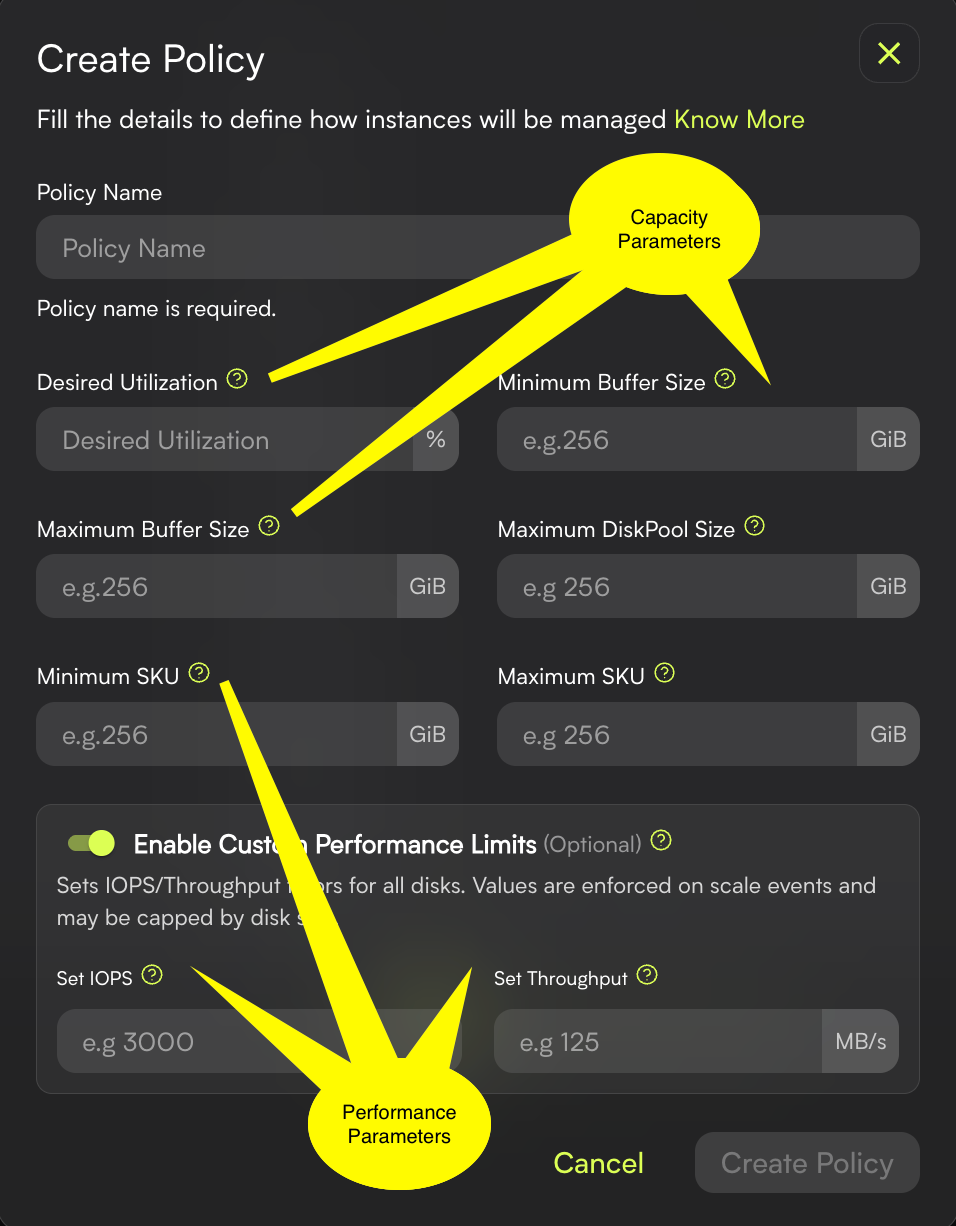
When you configure performance parameters (such as IOPS and Throughput), AutoScaler applies them to all existing disks on the VM, as well as to any new disks attached to accommodate increasing data size.
For minimum and maximum disk size settings, AutoScaler attempts to rotate existing disks with new disks matching the configured SKU sizes, without disrupting applications or workloads.
The Outcome: Optimal Storage for Real-World Workloads
With performance-aware AutoScaling, Lucidity ensures that your storage is:
- Right-sized for capacity
- Provisioned for performance
- Optimized for cost
- Safe for production workloads
The result is storage that adapts to your applications in real time - so your teams can focus on building and shipping, instead of manually tuning disks.
Table of Contents
Sign Up

Zishan Ali Saiyed