TL;DR
Lucidity AutoScaler now automatically discovers and propagates Azure NetworkAccessPolicy (DenyAll, AllowPrivate, AllowAll) to every disk it provisions. Zero config, full backward compatibility, Private Link endpoints preserved.
Azure gives you fine-grained control over who can export data from your managed disks - not just who can attach them to a VM. This post explains the NetworkAccessPolicy property, why it matters for security-conscious Azure customers, and how Lucidity preserves it end-to-end in AutoScaler.
Disk Exports Are a Separate Attack Surface
When securing an Azure Managed Disk, RBAC and encryption are the usual focus. But there is a less obvious threat: SAS URL export. Any principal with Microsoft.Compute/disks/beginGetAccess/action permission can generate a time-limited download URL and pull the raw contents of a disk - even one that is currently attached and running on a locked-down VM.
Azure addresses this with the NetworkAccessPolicy property on every managed disk:
The Azure Portal shows these settings under the disk's Networking blade:
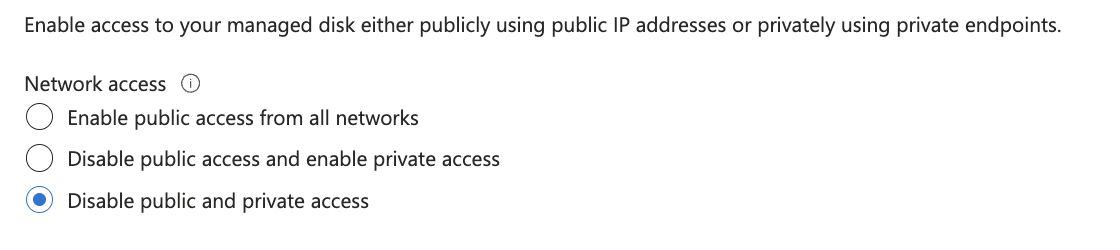
For workloads handling financial data, PII, or regulated healthcare records, DenyAll or AllowPrivate is not optional - it is a compliance requirement. The DiskAccess resource referenced by AllowPrivate is an Azure Private Link endpoint identified by its full ARM resource ID.
Security-First Storage Management
Lucidity AutoScaler manages the full lifecycle of your Azure Managed Disks - discovering existing disks at onboarding time, provisioning new disks when storage needs to scale, and continuously optimizing capacity based on actual usage. As part of our continuous efforts to strengthen the security posture of our customers' infrastructure, AutoScaler now discovers, stores, and enforces NetworkAccessPolicy across the entire disk lifecycle. Customers who have configured DenyAll or AllowPrivate on their Azure disks can be confident that every disk Lucidity provisions on their behalf carries the same policy - automatically, with no additional configuration required.
How It Works
The capability spans three stages of the disk lifecycle:
The diagram below illustrates the end-to-end flow across discovery, persistence, and propagation:

Key Guarantees
- Zero configuration required. AutoScaler reads the policy at onboarding time and carries it forward on every disk it provisions. You set it once in Azure; Lucidity honours it on every disk, every time.
- Fully backward-compatible. Disks without an explicit policy (the Azure default of AllowAll) are handled transparently. Existing environments require no changes.
- DiskAccess endpoint preserved for AllowPrivate. When your policy is AllowPrivate, the ARM resource ID of your private endpoint is stored and forwarded to every new disk - ensuring continuity of your Private Link configuration.
What This Means for Your Compliance Posture
If your organization runs workloads on Azure under PCI-DSS, HIPAA, ISO 27001, or any internal security standard that restricts raw disk export, Lucidity now upholds that posture as a first-class guarantee - not an afterthought. Storage scaling events, migrations, and onboarding operations all carry your NetworkAccessPolicy forward without any manual intervention.
Table of Contents
Sign Up

Sharad Singla